
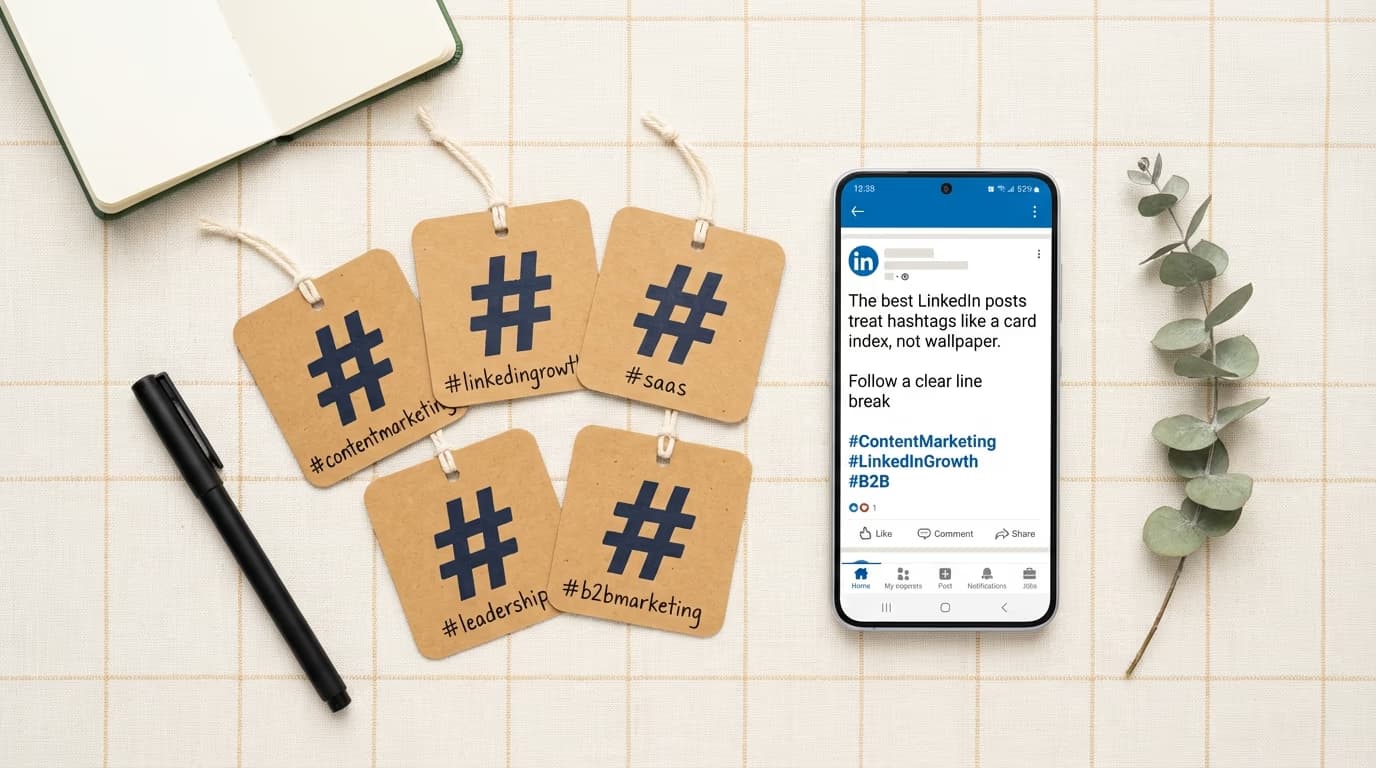
If you have been wondering how many hashtags to use on LinkedIn and which ones actually work best, the honest answer has changed significantly over the past two years - and most of the advice circulating online has not caught up yet. LinkedIn quietly removed the ability to follow hashtags in late 2024, which fundamentally altered how hashtags distribute content across the platform, and Rishi Jobanputra, LinkedIn's Senior Director of Product Management for Feed, put it plainly in a July 2025 post: "Hashtags are a nice to have, not a need to have." LinkedGrow's free LinkedIn hashtag generator can still help you build the right hashtag set for your industry, but understanding why and how hashtags work today is what separates a strategy that actually moves the needle from one based on outdated assumptions.
This is not a guide that tells you hashtags are dead. They are not, and dismissing them entirely would be a mistake. But the way they function has shifted from a distribution mechanism - where a post tagged with #Marketing would appear in the feeds of everyone who followed that hashtag - to a search and discovery label that helps LinkedIn's algorithm understand your content and makes your posts findable when people search those terms. The practical implications of that shift are significant, and once you understand them, both the right number of hashtags to use and how to choose them become much clearer.
What did LinkedIn change about hashtags?
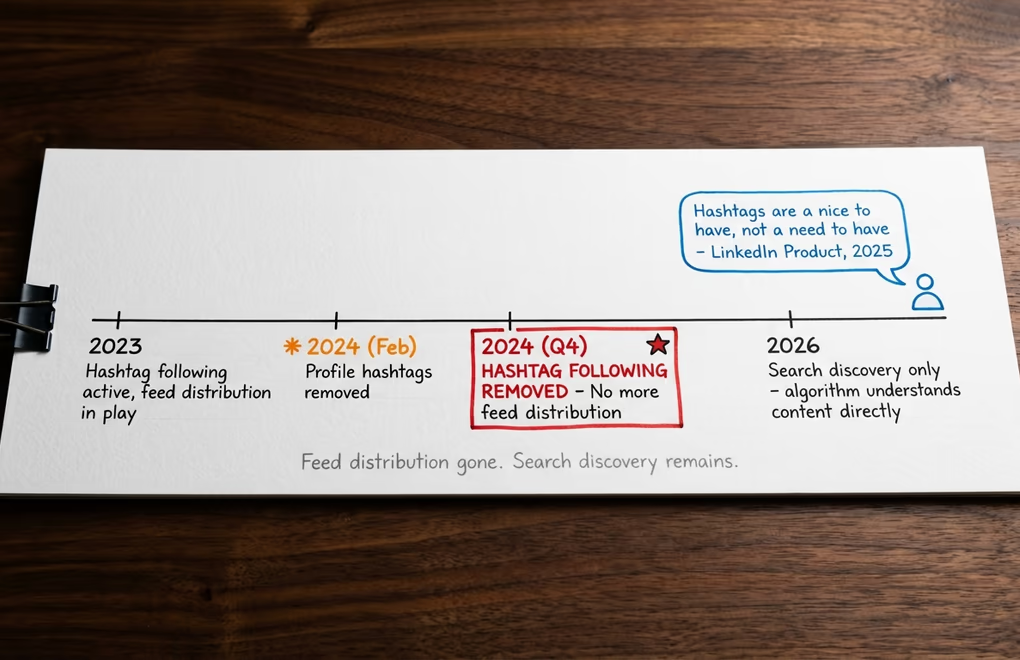
For years, the main value proposition of LinkedIn hashtags was audience reach through following. If you followed #ContentMarketing, posts tagged with that hashtag would appear in your feed from people outside your network. That mechanic is gone. LinkedIn removed hashtag following entirely across 2024, citing low usage, and the standalone hashtag feed that showed all posts using a specific tag has been phased out as well.
The reason LinkedIn was comfortable removing these features is that the platform built something better underneath them. LinkedIn's feed algorithm became sophisticated enough to understand what a post is about without relying on explicit hashtag signals. When you write a detailed post about content marketing strategy, the algorithm reads the post, understands the topic, and delivers it to people in your network and beyond who have engaged with similar content - without you needing to slap #ContentMarketing at the bottom for the algorithm to figure it out. Hashtags shifted from being a required signal for topic classification to being a supplementary one that provides a small additional nudge.
What remains is search discovery. When someone types #Leadership or #SaaS into LinkedIn's search bar, posts tagged with those terms still appear in the results. This is meaningful, particularly for niche topics where your ideal audience actively searches to stay informed on a subject, but it is a fundamentally different kind of reach than feed distribution. Search-based discovery tends to bring in readers who are specifically looking for the topic rather than passively scrolling past it, which means they are often higher-quality, more engaged readers - even if the volume is lower. Understanding this distinction shapes everything about how you should approach the question of which hashtags to use and how many.
How many hashtags hit the sweet spot on LinkedIn?
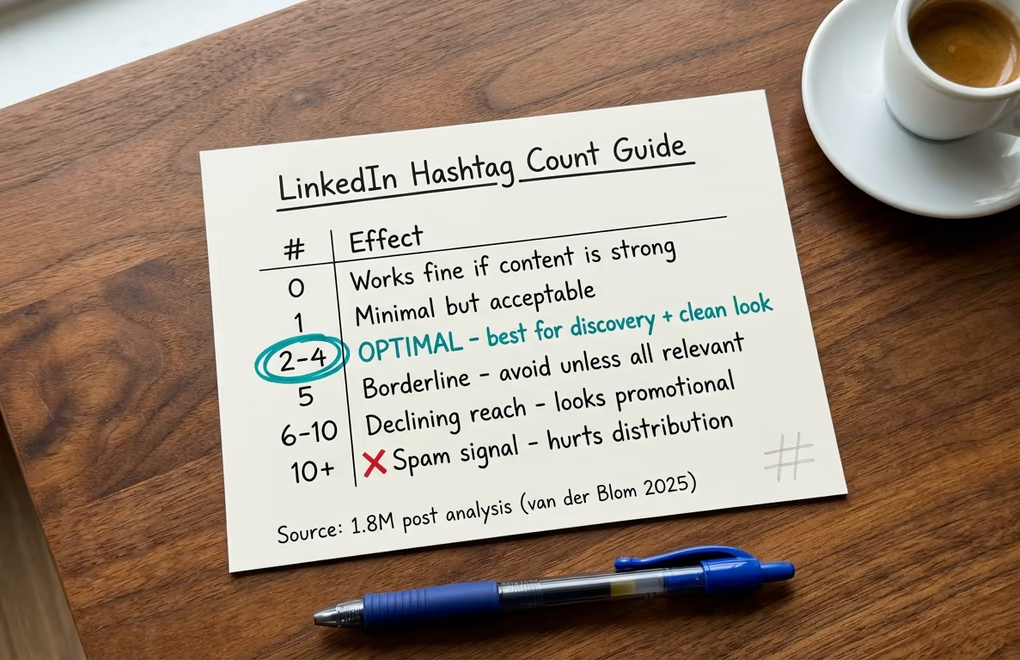
The most rigorous independent research on LinkedIn post performance comes from Richard van der Blom, whose annual Algorithm Insights Report analyzes millions of posts to identify what actually drives reach and engagement. His 2025 report, based on an analysis of 1.8 million posts, recommends 2 to 4 hashtags per post as the optimal range. This recommendation aligns with what most experienced LinkedIn creators have settled on through practical experimentation, and it holds up for a logical reason: a handful of relevant hashtags adds genuine topic signal without tipping into the territory that LinkedIn's spam filters associate with hashtag stuffing.
Using more than five hashtags does not help and may actively hurt your reach because LinkedIn's algorithm associates high hashtag counts with promotional or low-quality content. The days when Instagram-style hashtag maximalism - loading a caption with 15 to 20 tags to cast the widest possible net - translated to more reach on LinkedIn are long gone. Today, each hashtag you include should earn its place by being directly relevant to the post's topic, specific enough to mean something, and realistically searchable by the audience you are trying to reach.
It is also worth noting what some of the most followed LinkedIn creators do in practice. Many top performers use no hashtags at all, relying entirely on content quality and their established network for distribution, and they perform exceptionally well. This reinforces Jobanputra's point that hashtags are truly optional for creators who already have strong audience signals in the algorithm. For everyone building toward that level of reach, 2 to 4 well-chosen hashtags is still worth the 10 seconds it takes to add them.
Should you mix broad and niche hashtags?
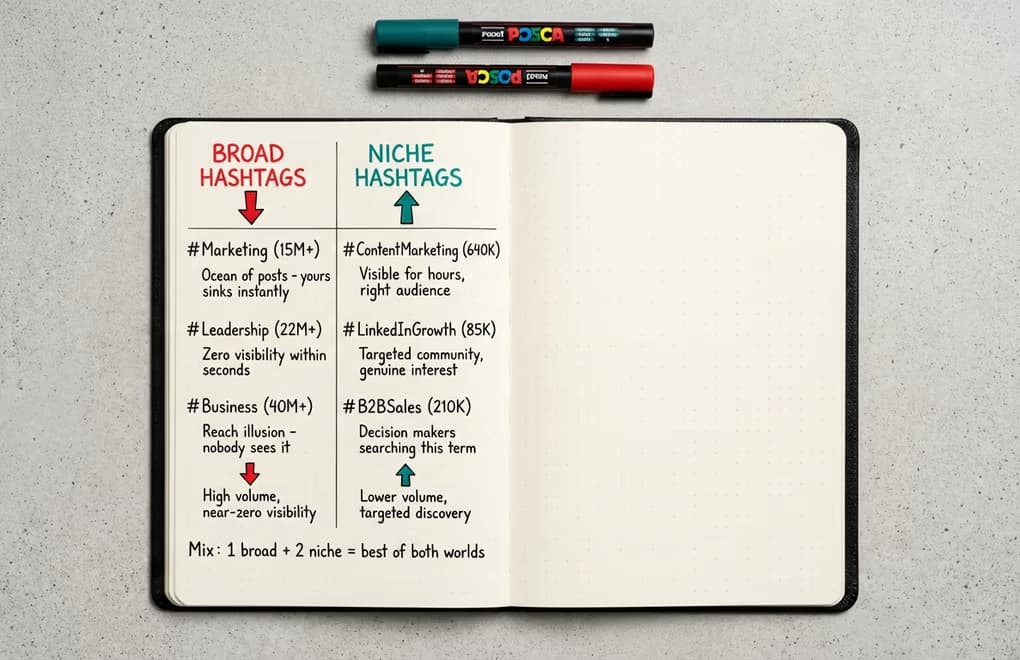
The choice between broad and niche hashtags is where most LinkedIn creators make their biggest strategic mistake, and it comes down to a fundamental misunderstanding of how search discovery works. A hashtag like #Marketing has tens of millions of posts associated with it. When someone searches that term on LinkedIn, they get a feed of hundreds of thousands of posts, updated by the second, and the competition for any single post to be seen in that stream is essentially zero - your post drowns the moment it is published. Big hashtags feel powerful because of their scale, but they deliver almost nothing to individual posts.
Niche hashtags work differently. A hashtag like #ContentMarketing or #LinkedInGrowth with several hundred thousand followers represents a community that is genuinely interested in that specific topic, and the post volume is low enough that a well-crafted post can remain visible in search results for days rather than seconds. The audience who finds your post via a niche hashtag is also far more likely to engage meaningfully because they searched for that specific topic on purpose - they were not just passively scrolling when your post appeared. This is the kind of engaged reader who follows you, comments thoughtfully, and comes back for more.
A practical hashtag mix for most LinkedIn posts looks like this: one moderately broad hashtag with a few million followers that covers the general category of your content, one or two niche hashtags with tens to hundreds of thousands of followers that match the specific topic of the post, and occasionally one ultra-niche hashtag with fewer than 50,000 followers if you are targeting a very specific professional community. LinkedGrow's hashtag generator organizes its recommendations by industry and volume tier, so you can quickly build this kind of layered mix without spending 20 minutes searching LinkedIn one hashtag at a time.
Branded hashtags unique to a company or creator can also aggregate your content for anyone searching your name. If you post consistently, a branded tag becomes a lightweight portfolio where someone can search it and find a curated stream of your work on a specific topic. This is a secondary benefit but worth including on posts that represent your core content pillars.
What are the best LinkedIn hashtags by industry?
The most effective hashtags combine a broad category tag with 2 niche-specific ones that match the exact topic of your post. Below are curated hashtag groups for the most active LinkedIn industries, so you can pick your broad + niche mix without spending 20 minutes searching. Always capitalize each word in multi-word hashtags (#ContentMarketing, not #contentmarketing) for accessibility, because screen readers parse PascalCase correctly and read each word separately.
Marketing and Sales
#Marketing, #ContentMarketing, #DigitalMarketing, #SocialMediaMarketing, #B2BSales, #SalesStrategy, #BrandStrategy, #SEO, #ContentStrategy, #LeadGeneration
Technology and SaaS
#Technology, #SaaS, #ArtificialIntelligence, #AI, #DataAnalytics, #ProductManagement, #CloudComputing, #Cybersecurity, #MachineLearning, #TechStartups
Leadership and Coaching
#Leadership, #ExecutiveCoaching, #ThoughtLeadership, #ProfessionalDevelopment, #Management, #CareerGrowth, #Mentoring, #Productivity, #Mindset, #PersonalBranding
Finance and Real Estate
#Finance, #Fintech, #Investing, #PersonalFinance, #RealEstate, #WealthManagement, #Banking, #FinancialPlanning, #PropertyInvesting, #CRE
HR and Recruiting
#HumanResources, #Recruiting, #TalentAcquisition, #EmployerBrand, #WorkplaceCulture, #HRTech, #Hiring, #DiversityAndInclusion, #PeopleAndCulture, #EmployeeEngagement
Entrepreneurship and Startups
#Entrepreneurship, #Startups, #SmallBusiness, #Innovation, #Growth, #Bootstrapping, #FutureOfWork, #Networking, #BuildInPublic, #FounderLife
Use LinkedGrow's hashtag generator to surface additional niche tags for your specific industry and content pillars, then build a rotation library of 15 to 20 hashtags grouped by topic so you can pull the right 3 for each post without researching from scratch.
How do you find the right hashtags for your niche?

Finding the right hashtags does not require any special tool. LinkedIn's own search bar gives you everything you need, and a focused 20-minute exercise will produce a go-to list you can rotate across your posts for months. Type a potential hashtag into LinkedIn's search bar (including the # symbol), check how many followers it has and how recently posts have been published, and use that information to decide whether it fits the broad, niche, or ultra-niche tier in your mix.
The follower count gives you the volume signal; the recency of posts tells you whether the hashtag has an active audience. A hashtag with 200,000 followers and posts published in the last few hours is active and healthy. A hashtag with 50,000 followers and the most recent post from three weeks ago is essentially dead - nobody searches it, and nobody posts to it, which means including it adds nothing. This recency check is the step most advice skips, and it is worth 30 seconds per hashtag to save you from wasting a slot on a tag that looks good on paper but delivers nothing in practice.
Another research method that works well is looking at what hashtags high-performing creators in your niche use consistently. When you find a post from someone in your space that has strong engagement, scroll to the bottom and note which hashtags they used. If they are an experienced creator who thinks carefully about their strategy, their hashtag choices are worth examining - not to copy wholesale, but to validate whether certain tags are worth testing in your own mix. Because the LinkedIn algorithm now understands content semantically, the hashtags that resonate in your niche tend to be consistent across creators covering similar topics, which makes this kind of competitive research reliable.
Once you have built a master list of 15 to 20 hashtags that cover your content pillars, you can group them by topic and pull the 2 to 4 most relevant ones for each specific post you write. Using LinkedGrow's AI post generator to draft and refine your posts makes this even faster because the platform surfaces relevant hashtag suggestions based on the content you are writing, so you are not manually cross-referencing a spreadsheet every time you publish. The goal is to make hashtag selection a two-second decision, not a five-minute deliberation that disrupts your writing flow.
Where should hashtags go in your LinkedIn post?
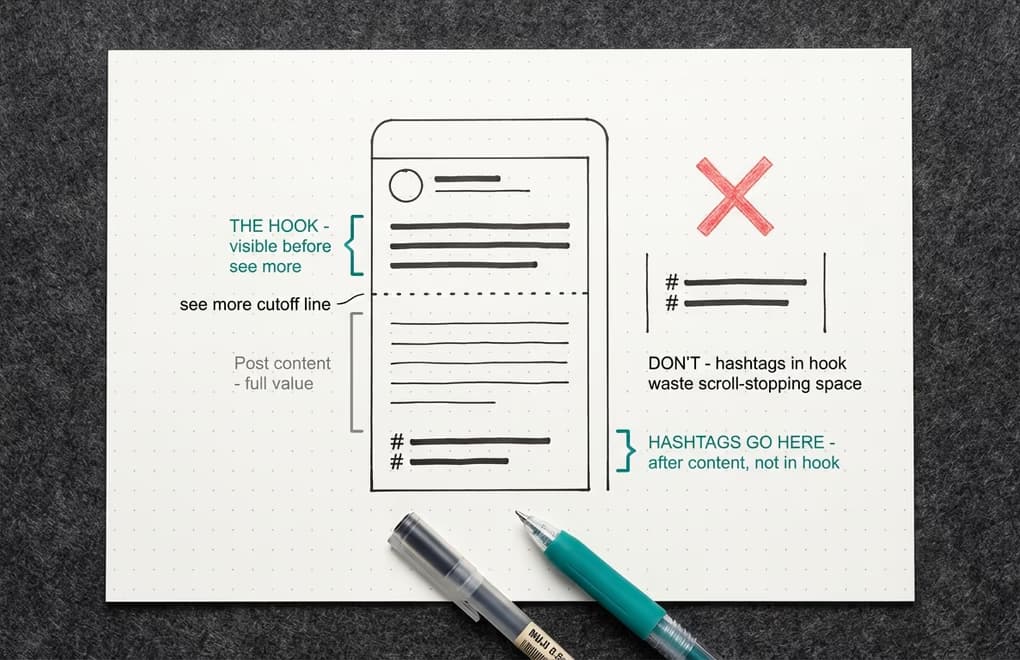
The question of where to place hashtags in a LinkedIn post matters more for the reader experience than for the algorithm. LinkedIn's system reads the entire post before deciding how to distribute it, so placement does not change how the algorithm processes the topic signal. What placement does affect is how your post looks to a human reader, and specifically how your hook lands in the first 2 to 3 lines before the "see more" cutoff. Getting the formatting of those opening lines right is already challenging without voluntarily interrupting them with hashtags.
Those first 2 to 3 lines are the most valuable real estate in your entire post. Everything before the "see more" click needs to earn that click, which means every word in your opening should be dedicated to stopping the scroll and creating enough curiosity that someone wants to read the rest. Putting hashtags in your first 2 lines wastes that space on functional labels rather than compelling content, and it makes your post look like it was written for algorithms rather than people. Writing a genuinely powerful hook is already hard enough on its own.
Place your hashtags after the last line of your content, either on the same line as your closing sentence or on their own line below it. Separate them with a space or a line break from the main text so there is a clear visual distinction between your content and the topic labels. Some creators go one step further and put hashtags in the first comment to keep the post body entirely clean, and this approach is perfectly valid - the hashtags still get indexed by LinkedIn for search purposes even when they are in a comment rather than the post itself. The performance difference between body and comment placement is negligible, so it comes down to whichever you find aesthetically cleaner.
One practice that is almost universally counterproductive is using the same set of hashtags on every post regardless of content. Rotating your hashtags based on the specific topic of each post keeps your search discovery profile varied and ensures your content reaches people searching for each specific topic rather than just the handful of general ones you have memorized. Building that rotation is exactly what a session with LinkedGrow's hashtag generator is designed to support - you get curated lists by industry and content type, so matching the right tags to the right posts becomes a quick lookup rather than a fresh research exercise every time.
What hashtag mistakes should you avoid on LinkedIn?
Stuffing 10 or more hashtags into a single post is the most common mistake, and LinkedIn's algorithm flags high-count posts as promotional or spammy, actively reducing their reach. The era of Instagram-style hashtag maximalism never worked well on LinkedIn, and in 2026 it is counterproductive. Stick to 3 tags per post and make each one earn its place.
Using identical hashtags on every post tells LinkedIn your content is formulaic and limits your discovery across different search terms. Rotate your hashtags based on the specific topic of each piece so that each post reaches a distinct slice of your target audience. Build a library of 15 to 20 vetted tags grouped by content pillar, and pull the best 3 matches per post from that library.
Chasing trending hashtags unrelated to your expertise might generate a brief impression spike, but the audience that finds you through an off-topic tag will not follow, engage, or convert. LinkedIn's algorithm rewards topical consistency over time, so staying in your lane with every post (and every hashtag) compounds into stronger algorithmic signals for your content. Building a consistent content strategy matters far more than any individual hashtag choice.
The Hashtag Strategy That Works in 2026
The advice that still circulates online (use 10 to 20 hashtags, always pick the biggest ones, treat hashtags as your primary discovery mechanism) was never ideal, and in 2026 it is actively misleading. LinkedIn removed hashtag following, and the platform's own product leadership confirmed hashtags are supplementary, not essential. The practical guidance that holds up: use 3 hashtags that are directly relevant to what you wrote, mix one broader category tag with 2 niche-specific ones, place them at the end, and stop overthinking it.
Hashtags are a small part of a larger LinkedIn content system. The creators who grow consistently are the ones whose content is genuinely valuable, posted on a consistent schedule, and crafted to earn engagement from the first line. Spend most of your effort on the quality of the content itself, use a handful of well-chosen hashtags at the end, and let LinkedGrow's tools handle the research and generation so that decision takes seconds rather than minutes.
Frequently Asked Questions
Yes, but with modest expectations. LinkedIn removed hashtag following in late 2024, so hashtags no longer deliver your posts to people subscribed to a topic feed. They still help with search-based discovery and add light topic context for the algorithm. Use 2 to 4 relevant ones per post - they cost nothing and provide a small but real benefit.
Two to four is the most well-supported recommendation, based on Richard van der Blom's analysis of 1.8 million LinkedIn posts. Using more than five carries diminishing returns and risks the algorithm flagging your post as spammy. One well-chosen niche hashtag is more valuable than ten generic ones.
At the end, after your main content. The first two or three lines of your post appear before the 'see more' cutoff and should be devoted entirely to your hook. Cluttering that prime real estate with hashtags reduces the impact of your opening and can look visually messy in the feed.
Broad hashtags like #Leadership or #Marketing have millions of followers but enormous competition - your post disappears almost instantly in the feed. Niche hashtags with tens or hundreds of thousands of followers reach a smaller but more targeted audience and face far less competition, making it more likely your post is discovered by people genuinely interested in the topic.
Type potential hashtags into LinkedIn's search bar to see follower counts and recent posts. Aim for hashtags with 10,000 to 500,000 followers for niche reach, and mix one or two broader ones for wider visibility. LinkedGrow's hashtag generator surfaces curated hashtag lists by industry so you don't have to research from scratch.
The post you keep meaning to write takes four minutes here.
LinkedGrow turns a link, a video or a rough idea into a LinkedIn post written in your own voice, then puts it in the calendar for the morning your audience is awake.
Start free for 7 days