
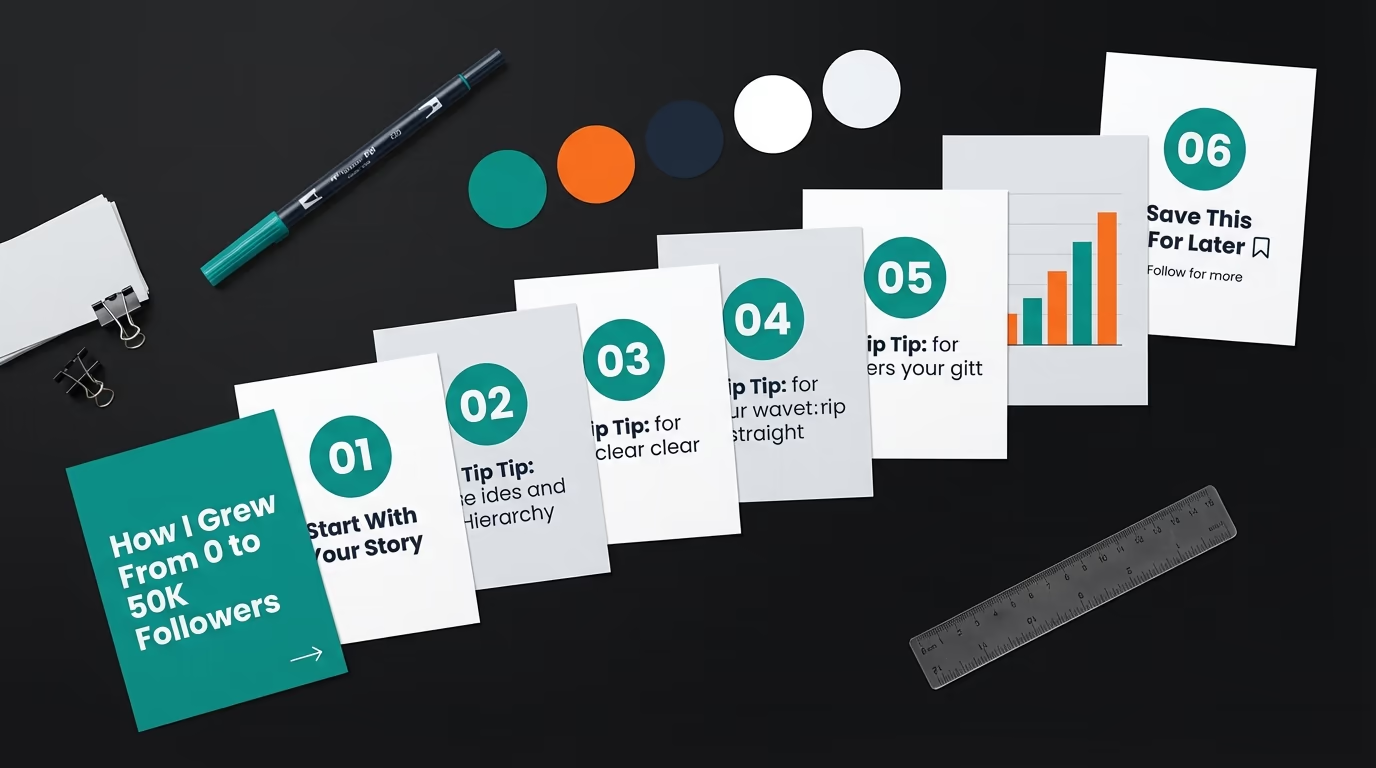
LinkedIn carousel posts consistently outperform every other format on the platform. Every swipe a reader makes generates dwell time, one of the strongest ranking signals in LinkedIn's algorithm. A 10 slide carousel holds attention for 15 to 20 seconds on average, against 3 to 5 seconds for a text post someone skims past. Despite that difference, fewer than 2 percent of LinkedIn posts use the carousel format, which leaves it wide open for anyone who starts using it consistently.
This guide covers the 10 carousel templates that drive the most engagement, real examples with their actual numbers, the exact size and file specs, hook formulas, and the design rules that keep people swiping to the last slide. Whether you build in LinkedGrow's carousel generator or design your own in Canva or PowerPoint, each template gives you a proven starting point.
Why do carousels outperform every other LinkedIn format?
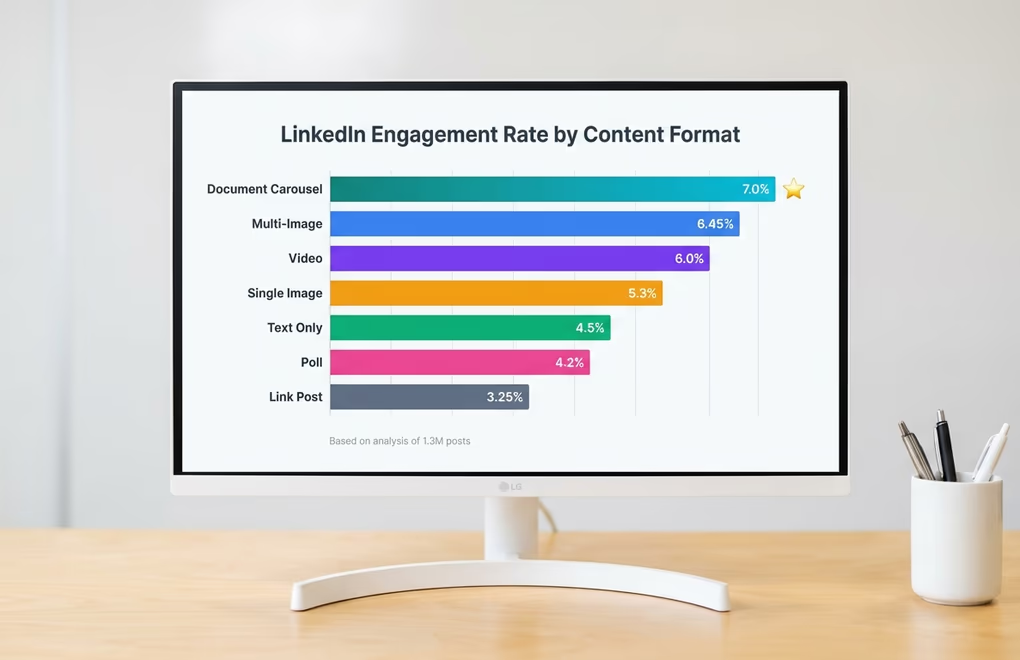
Document carousels, uploaded as PDFs that render as swipeable slides, earn the highest engagement rate of any post format on the platform. The numbers hold for company pages with millions of followers and for creators with a few thousand connections alike. LinkedIn now leans on dwell time as a primary ranking signal, and each swipe registers as a small action that tells the algorithm this person is choosing to consume more. That signal beats a quick like or a brief skim, which is why the algorithm pushes carousels harder than text or single image posts.
A psychological mechanism works in your favor too. When someone starts swiping, they have made a small commitment, and each swipe after that reinforces it, which is why smart creators place their best insight on slide 7 or 8 rather than slide 2. By then the reader is committed and the dwell time is already strong enough to trigger wider distribution. Saves follow the same logic, since a framework or checklist in slide form earns far more saves than the same content as text, which feels more disposable.
Which 10 carousel formats drive the most engagement?
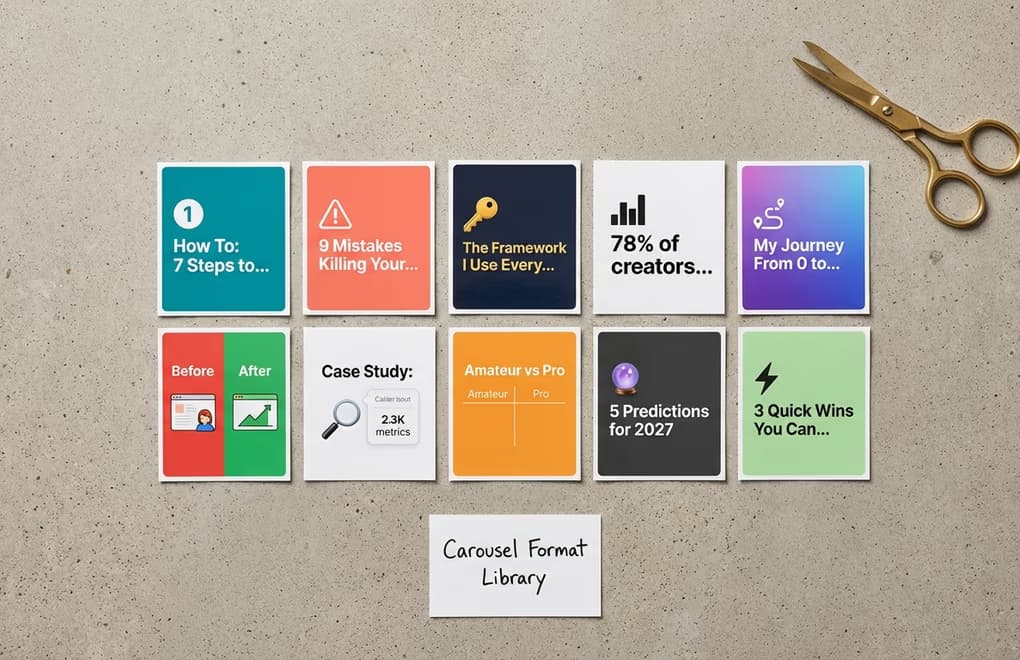
The format you choose shapes how people interact with the carousel. These are the 10 that consistently earn the strongest engagement, drawn from thousands of high performing LinkedIn carousels and organized by what each one does best.
Educational How To Guides
This is the highest performing carousel format on LinkedIn. Each slide teaches one step of a process, and the reader swipes through the whole workflow from start to finish. Keep every slide on a single action, because the moment two ideas share a slide, clarity drops and so does the swipe through rate. A carousel like "How to write a LinkedIn hook in 7 steps", one step per slide with a clear heading and 25 to 40 words of explanation, performs most reliably across every niche and audience size.
Numbered Tips and Listicles
Numbered content taps the same psychology that makes BuzzFeed headlines work, where the number in the title sets an expectation the reader wants to complete. "9 mistakes killing your LinkedIn engagement" or "12 tools I use to create content in half the time" promise that each swipe delivers one more item from the list. They earn high save rates because people treat them as reference lists to revisit later, especially when the tips are specific rather than vague.
Frameworks and Cheat Sheets
If you want saves, this is your format. A carousel that hands over a reusable framework or a cheat sheet feels like a free resource the reader would normally pay for. "The content calendar framework I use every week" or "My LinkedIn hook formula cheat sheet" generate saves at rates well above other formats, because they give lasting utility. The versions that work best name the framework something memorable so people associate it with you, turning one carousel into a brand building asset.
Data and Statistics Compilations
One bold statistic per slide with little supporting text makes a shareable carousel that positions you as someone on top of the data. These work best when the numbers are surprising or directly relevant to your audience's daily work. A carousel like "LinkedIn engagement data that will change how you post", with one eye catching number and a single sentence of insight per slide, earns shares because people pass the data along to their own network.
Storytelling and Journey Posts
Personal narratives with clear milestones translate well into carousels, because the slide structure mirrors how a story moves from start to finish. A deck that opens on a line like "6 months ago I had 200 followers, here is what changed" and then gives each chapter its own slide with a specific lesson tends to travel a long way. These earn the highest comment rates of any carousel format, because people relate to the struggle and want to share their own.
Before and After Comparisons
Visual transformation pairs engage because they create an instant sense of progress. Show a LinkedIn profile before and after optimization, or a post hook before and after a rewrite. The contrast does the persuading for you, since readers see the distance between the two states and want to know how to close it for themselves.
Case Studies With Real Numbers
A carousel that walks through a real example, the challenge, what was tried, what worked, and the measurable result, carries more credibility than any amount of abstract advice. A reliable structure opens on slide 1 with the headline result as the hook, sets up the problem on slides 2 and 3, walks through the approach on slides 4 to 7, and shows the outcome with specific numbers on slides 8 and 9. These take more effort, but they build trust faster than any other format because they prove you speak from experience.
Comparison Posts
Comparison carousels like "Amateur vs Pro" or "what I thought success looked like vs what it actually is" work because readers see themselves on one side and feel pulled toward the other. Each slide pairs one "wrong" approach with its "right" counterpart, which draws comments from people saying which camp they fall into.
Prediction and Trend Analysis
Forward looking carousels that share where an industry or platform is heading spark conversation, because everyone has an opinion about the future. "5 LinkedIn trends that will define content creation next year" invites agreement and pushback alike, the kind of multi threaded discussion the algorithm rewards most heavily.
Quick Wins and Micro Lessons
Each slide delivers one small insight the reader can use right now, like "5 LinkedIn settings most people forget to change" or "quick fixes for your profile that take under 2 minutes". These earn shares because they feel helpful without asking much of the person sharing them.
What do high performing LinkedIn carousel posts look like?

The clearest way to see what works is four real LinkedIn carousel examples that earned real numbers, each using a different template from the list above, with the reason it performed.
Semrush's "SEO Checklist for 2026" used the numbered tips format across 12 slides, each covering one audit step in a single sentence with a bold icon. It collected over 1,200 reactions and 180 comments because every tip was actionable on its own, and commenters tagged colleagues who needed a particular slide. A carousel that is useful slide by slide, not just as a whole, earns the tagging that multiplies reach.
Teachable's creator economy report turned survey data into a compilation carousel, one statistic per slide with a short interpretation underneath. It earned over 400 reposts because each slide worked as a standalone screenshot people could drop into group chats and Slack. Data carousels perform best when every slide stands alone, since people rarely share the full deck and instead screenshot the one number that surprised them.
beehiiv's Valentine's Day campaign used a storytelling format, 8 slides around a single theme, earning 85 reactions, 21 comments and 10 reposts from a small following. What worked was the emotional hook on slide 1 paired with a consistent template that made every slide feel connected. For smaller accounts, those engagement per follower ratios often beat text posts, because the format keeps people in the post longer.
A SaaS founder's "5 mistakes I made scaling to $1M ARR" followed the case study format, each slide covering one mistake, what it cost, and what they did instead. It pulled 600+ comments because the mistakes were specific and relatable, and nearly every commenter shared their own version of the same error. Personal failure stories in carousel form outperform the same story as a text post, because the slide by slide reveal builds a tension that a wall of text cannot.
What is the correct LinkedIn carousel post size?
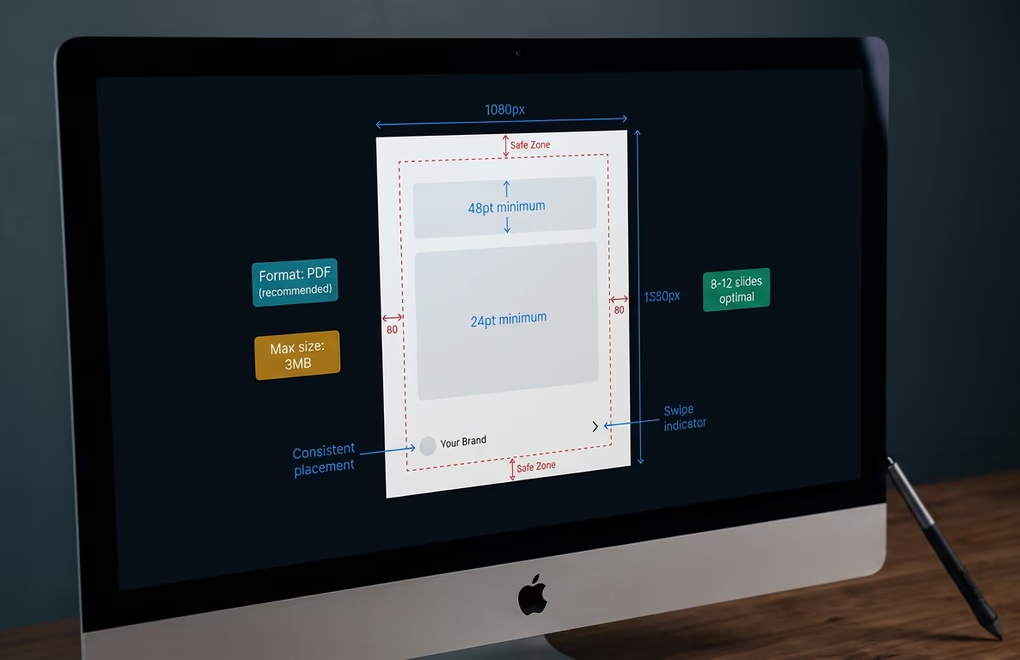
The correct LinkedIn carousel post size is 1080 by 1350 pixels, portrait at a 4:5 ratio, which fills the most screen on the phones where most people read the feed. Square at 1080 by 1080 (1:1) and horizontal at 1920 by 1080 (16:9) upload just as cleanly. A carousel is one PDF file rather than a set of separate images, and it goes up under LinkedIn's 100 MB limit with as many as 300 pages.
LinkedIn carousel size and specs at a glance
- Dimensions
- 1080 x 1350 px (portrait 4:5, recommended), 1080 x 1080 px (square 1:1), or 1920 x 1080 px (horizontal 16:9)
- File format
- PDF (renders most reliably; PPTX and DOCX also accepted)
- File size
- Under 3 MB ideal for sharp text (LinkedIn hard limit is 100 MB)
- Slide count
- 8 to 12 slides is the sweet spot; under 5 loses reach (LinkedIn allows up to 300 pages)
- Resolution
- Export at 300 DPI in RGB, never CMYK, so text stays crisp on mobile
- Font size
- 48pt for headings, 24pt for body on a 1080px canvas
- Safe zone
- Keep content 80px from every edge so nothing gets clipped
One detail trips up almost every carousel size guide, including the pages that rank for this query right now, and it is the size limit itself. That limit applies to the whole PDF, not to each slide. A LinkedIn carousel is a single document that the feed turns into swipeable pages, so the 100 MB ceiling and the under 3 MB target both cover the one file you upload, never slide by slide. A carousel also differs from LinkedIn's other swipeable format, the multi image post, where you upload separate image files that each carry their own limit. So if a guide tells you a carousel slide can be a 10 MB JPG, it has quietly mixed the two formats together. Build every slide at 1080 by 1350, export the deck as one PDF, and keep that file under 3 MB so the text stays crisp after LinkedIn compresses it.
The size you pick also decides how the carousel renders on each device, and that matters because more than half of LinkedIn sessions happen on a phone. A portrait 4:5 deck fills the mobile viewport almost completely, so every slide owns the screen as the reader swipes. A 16:9 horizontal deck does the opposite on a phone, sitting in a short band with empty space above and below it, which is why 16:9 only earns its place for dashboards or wide desktop comparisons. On desktop each ratio renders at a fixed width inside the feed card, with left and right arrows and a page counter that LinkedIn draws on top of your slide. Leave at least 80 pixels of clear margin on every edge so those arrows and that counter never land on your text.
Single image posts use different dimensions from carousels, so do not borrow those numbers here. The LinkedIn post image size guide has the exact pixels for every feed image format, and the LinkedIn image sizes guide lists every dimension in one place.
Slide count matters, and the sweet spot is 8 to 12 slides. A carousel with fewer than 5 slides earns noticeably less reach, because there is not enough content to build the dwell time the algorithm reads as a signal worth spreading. LinkedIn's hard ceiling is 300 pages, but you rarely want more than 15, since reader drop off climbs with every slide past 12. The structure that performs most reliably is a hook slide, 8 to 10 content slides with a single idea each, and a closing call to action.
Typography on a slide follows different rules from web or print, because people read on a small screen while they scroll fast. On a 1080 pixel canvas, set headings at 48 point and body text at 24 point, and keep each slide between 25 and 50 words so it carries one clear thought without feeling dense (the LinkedIn character counter keeps you inside that range without opening a separate doc). A small right pointing arrow on the first couple of slides also helps, since some readers do not realise the content is swipeable until they see the cue.
How to create a LinkedIn carousel post (step by step)
LinkedIn has no built in carousel builder. You create the slides elsewhere, save them as a multi page PDF, and upload that file as a document post, which LinkedIn then renders as the swipeable carousel everyone sees in the feed. So how to post a carousel on LinkedIn always comes down to two stages, building the slides and then uploading the PDF. The three methods below cover every skill level and budget.
Method 1: Upload a PDF document
Once your slides are a single PDF, posting the carousel takes under a minute. Open the LinkedIn post composer, click the document icon (it usually sits behind the "Add a document" or "+" menu), and select your PDF. LinkedIn asks for a document title, and that title shows above the carousel in the feed, so make it specific rather than a raw file name. Add your caption, check that the first slide thumbnail looks sharp in the preview, and publish. The carousel appears as swipeable slides with page indicators, and every swipe feeds the dwell time signal that drives distribution.
Method 2: Build slides in Canva or PowerPoint
Canva, Google Slides, Figma and PowerPoint all work for the slides themselves. Set the canvas to 1080 by 1350 pixels in portrait, design each slide around one idea, then export the deck as a PDF. In Canva you pick "Share, Download, PDF Standard", and in PowerPoint or Google Slides you use "Save as" or "Download" and choose PDF. The catch is that none of these was built for LinkedIn, so you manage the dimensions and the branding by hand on every slide. It is free and flexible, and also the slowest of the three once you count the design work.
Method 3: Use LinkedGrow's carousel generator
LinkedGrow's carousel generator removes the manual setup. The canvas is already locked to LinkedIn carousel dimensions, the templates follow the one idea per slide rule, and your brand colors, logo and handle apply to every slide automatically. You pick a template, type or generate the text for each slide, and export a post ready PDF in a few minutes, with no dimension math and no consistency checks to run yourself. It is the fastest path from idea to a published LinkedIn carousel post, especially if you make carousels regularly rather than once.
Which hook formulas work best for LinkedIn carousels?
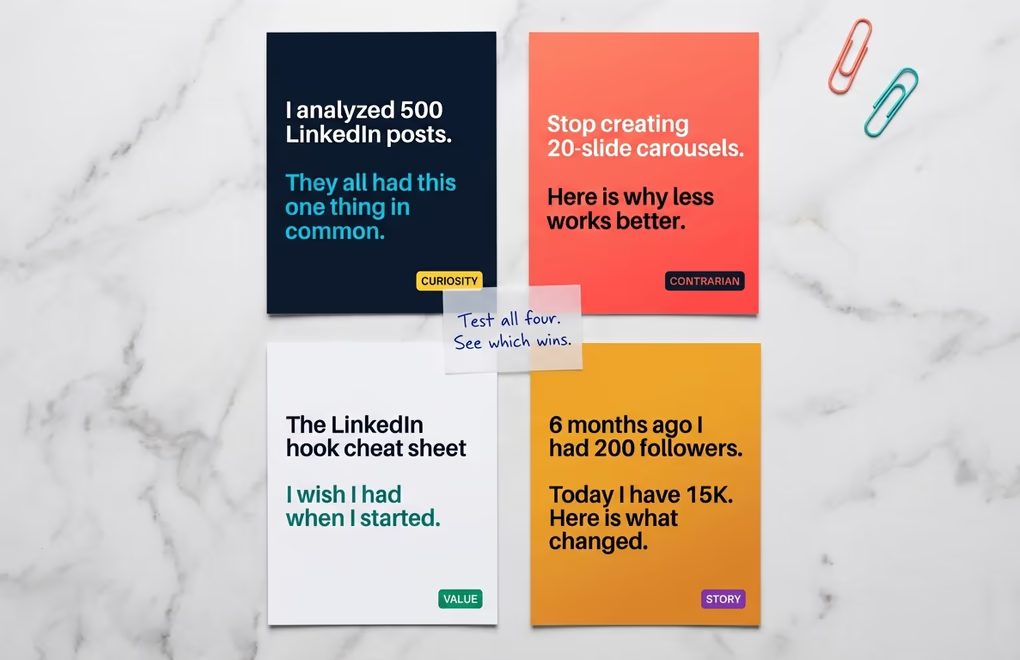
A carousel hook works differently from a text post hook, because it has to stop the scroll and convince someone to start swiping at the same time. A text post hook only needs the "see more" click, while a carousel hook asks the reader to commit to swiping. Carousels start with an edge, though, because the first slide looks different from everything around it, so you already hold more attention than a text post would get.
Curiosity hooks drive the highest swipe through rates, because they open a loop the reader can only close by continuing. A hook like "I analyzed 500 LinkedIn posts, and they all had this one thing in common" works because the number adds credibility and the unresolved "this one thing" makes swiping feel necessary. A line such as "the framework behind every viral carousel, and it is not what you think" does the same, since the doubt it casts on the reader's assumptions pulls them forward.
Value hooks generate the most saves because they promise something the reader will want to reference later. A hook like "the LinkedIn hook cheat sheet I wish I had when I started" or "learn to write carousels in 10 minutes, a visual guide" works because the reader knows before swiping that the carousel holds something worth keeping. LinkedGrow's hook generator creates several opening variations for any topic, so you can test which one lands best with your audience.
Contrarian hooks earn the most comments, because disagreement is one of the strongest conversation starters on LinkedIn. A hook like "stop building 20 slide carousels, here is why shorter works better" or "the most popular carousel advice is wrong, let me show you" pulls replies from people who agree and people who do not, which is the multi threaded discussion the algorithm weighs most heavily. Just back the take with real reasoning in the slides that follow, since a provocative hook over weak content costs you credibility faster than a dull hook over solid value.
Which design principles keep people swiping LinkedIn carousels?

You do not need to be a designer to make a carousel look professional, but a few principles separate the decks people swipe all the way through from the ones they drop after slide 2. The first is also the simplest, which is one idea per slide, no exceptions. Put two concepts on one slide and you make the reader process two things at once, which breaks the swiping rhythm that keeps them going. Treat each slide as a single sentence in a conversation, not a paragraph in an essay.
Visual consistency is what makes a carousel feel like one piece of content rather than a random stack of graphics. Pick one background, one heading font, one body font and one accent color, then hold them across every slide. Put your brand colors, logo and handle in the same spot on each slide, so your identity travels even when someone screenshots a single slide. LinkedGrow's carousel generator applies your branding to every slide automatically, so consistency is built into the workflow instead of something you police by hand.
Contrast is what keeps text readable on any background, and you want a minimum 4.5 to 1 ratio between text and background. Dark text on a light background is safest, since it holds up in every lighting condition, including the bright sunlight people read LinkedIn in on a commute. If you use colored backgrounds, test them at low brightness on your phone first, because what looks clean on a calibrated monitor can turn unreadable on a dimmed screen. Light text on dark works too, but avoid thin font weights that vanish against dark colors.
The last slide is prime real estate that too many creators waste. Give it a clear call to action, whether that is follow for more, save for later, comment with your take, or a link in your bio. Do not let the carousel just end, because readers who reached the last slide are your most engaged audience and the most likely to act on a specific next step. A simple closing line like "save this and follow for more frameworks like this" turns passive swipers into followers. The same discipline applies to the caption beside the carousel, and our LinkedIn post formatting guide covers line breaks, bold text and the hook structure that gets people to open the deck.
How do you create your first LinkedIn carousel today?
The biggest mistake with carousels is overthinking them. You do not need custom illustrations or a design degree. You need one clear idea, 8 to 12 slides that each make one point, consistent branding, and a hook that earns the first swipe. Start with the easiest format, a numbered tips carousel on a topic you know well, and publish it. Your first one will not be perfect, and it does not need to be. What matters is that you start using a format the data consistently shows outperforms everything else on LinkedIn, while 98 percent of creators still are not.
To skip the design learning curve, LinkedGrow's carousel generator handles the visual side for you. Pick a template, type your text, apply your brand colors and logo, and export a post ready PDF. Before you publish, the LinkedIn post preview tool shows how the carousel and caption will render in the feed, and the LinkedIn post templates library gives you ready to edit frameworks for the caption. You can also generate AI images inside the editor to add original visuals to any slide. The whole thing takes 15 to 20 minutes and costs nothing beyond your LinkedGrow subscription.
Frequently Asked Questions
The sweet spot is 8 to 12 slides. Carousels with fewer than 5 slides see a significant drop in reach because there is not enough content to generate meaningful dwell time. Going past 15 slides works for highly detailed guides but risks drop off if the content is not strong enough to hold attention through every swipe.
The best LinkedIn carousel post size is 1080 by 1350 pixels, portrait at a 4:5 ratio, because it fills the most screen on mobile where most people browse. Square (1080 by 1080) and horizontal (1920 by 1080) upload cleanly too. Save the carousel as a PDF under 3 megabytes to keep the text sharp.
Portrait at 1080 by 1350 is the default because it takes up the most room in the mobile feed. Horizontal at 1920 by 1080 (16:9) suits dashboards and wide desktop comparisons, while square at 1080 by 1080 sits in between and repurposes most easily across other platforms.
Yes, carousels consistently earn more engagement than regular posts. Document carousels have the highest engagement rate of any LinkedIn format, because the swipe interaction creates dwell time that the algorithm reads as a strong positive signal and then distributes wider. Despite this, fewer than 2 percent of LinkedIn posts use the carousel format, which leaves a wide opening.
It is for the whole file. A LinkedIn carousel is one PDF that the feed renders as swipeable pages, so the 100 MB ceiling and the under 3 MB target both apply to the single document you upload, not to each slide. Guides that quote a 10 MB per slide limit are describing LinkedIn's separate multi image post, not a PDF carousel. Build every slide at 1080 by 1350 pixels and export the deck as one PDF.
Yes, LinkedGrow's carousel generator includes a visual editor with prebuilt templates, drag and drop elements, custom branding, and PDF export built specifically for LinkedIn. You pick a template, customize the text and colors, and export a carousel ready to post without any design tools or experience.
PDF is the best format, and LinkedIn renders PDF pages as swipeable slides with smooth transitions and sharp text. You can also upload PPTX or DOCX files, but PDFs produce the most consistent results across devices. Keep the file under 100 MB (LinkedIn's limit) and ideally under 3 MB to avoid compression artifacts that blur your text and graphics.
Open the LinkedIn post composer, click the three dots or the document icon labeled 'Add a document,' select your PDF file, and give it a title that appears above the carousel in the feed. Write your caption, preview the first slide thumbnail, and publish. LinkedIn converts each PDF page into a swipeable slide automatically. The document title is separate from your caption and shows as a clickable header, so make it specific and benefit driven rather than a generic filename.
The post you keep meaning to write takes four minutes here.
LinkedGrow turns a link, a video or a rough idea into a LinkedIn post written in your own voice, then puts it in the calendar for the morning your audience is awake.
Start free for 7 days