
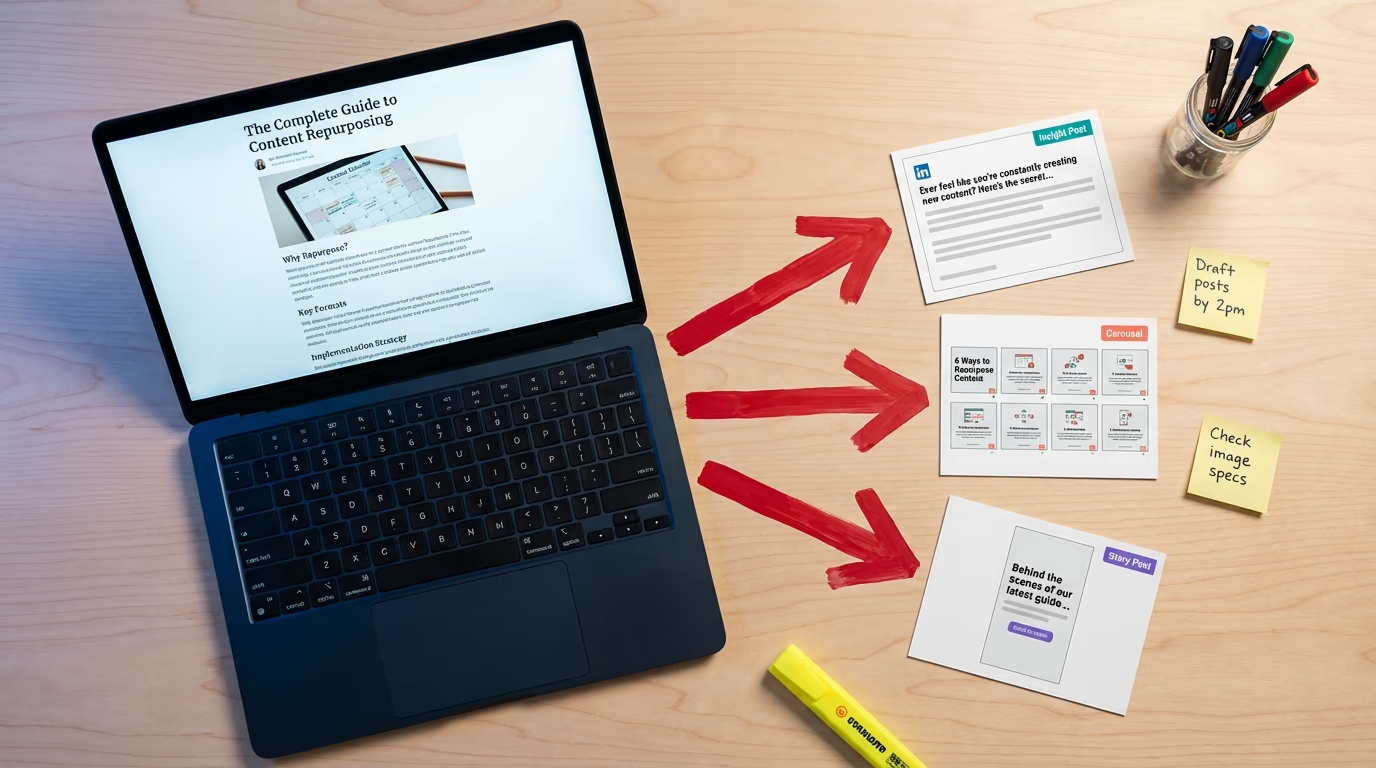
You spent four hours writing a blog post. You researched the topic, outlined the sections, wrote 2,000 words of genuinely useful content, polished the formatting, and hit publish. Then you shared the link on LinkedIn with a one-line description, got 15 likes and maybe two comments, and moved on to writing the next blog post. That cycle is the single biggest waste of effort in content marketing, because every blog article you write contains enough raw material for five to seven LinkedIn posts that can each reach thousands of people individually. Learning how to turn blog posts into LinkedIn content that drives traffic back to your website is what separates creators who spend all their time writing from creators who spend half the time and get ten times the distribution. LinkedGrow's blog-to-LinkedIn feature automates the extraction step, but the strategy behind it is what makes the results compound.
Blog-to-LinkedIn repurposing is fundamentally different from video-to-LinkedIn repurposing because your source material is already written text. You are not translating between formats - you are atomizing one long written piece into multiple shorter pieces, each optimized for how professionals consume content in a feed where they are scrolling between meetings. This makes blog repurposing the lowest-effort, highest-volume path in the entire content repurposing playbook, and once you have a system for it, every article you publish starts generating LinkedIn engagement before you even think about writing something new.
This guide covers the six formats that turn one article into a week of LinkedIn content, the traffic strategies that bring readers back to your blog without triggering the link penalty, the timeline for spacing your repurposed posts, and why the zero-click approach actually drives more blog visitors than sharing a link ever did.
Why is your best blog content going to waste on LinkedIn?
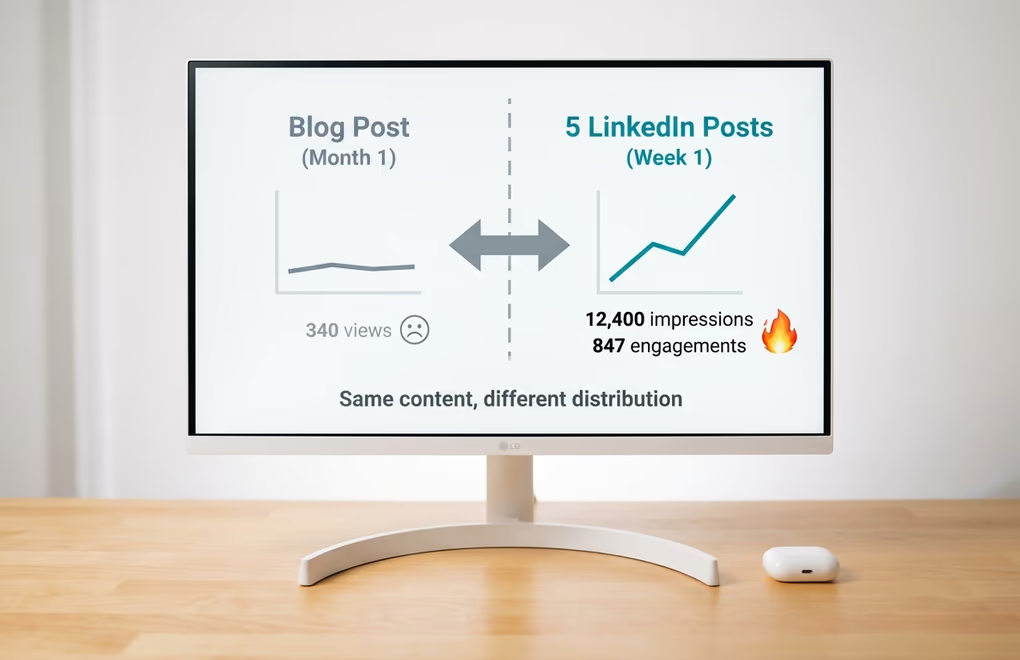
The average blog post takes nearly four hours to write and reaches a few hundred people through search over the first month, assuming your SEO is decent. A well-crafted LinkedIn post takes 15 minutes to write and can reach thousands of professionals in 48 hours. The disconnect between where creators spend their time and where they get their distribution is staggering, and it persists because most people think of blog writing and LinkedIn posting as completely separate activities rather than two stages of the same content lifecycle.
The real problem is not that your blog content is bad - it is that your blog content is invisible to the audience that would benefit from it most. Your LinkedIn connections are professionals who would genuinely find your articles useful, but fewer than one percent of them will ever visit your website organically. They live in the LinkedIn feed, they make decisions based on what they read there, and they engage with people who show up in that feed consistently. Repurposing is how you meet them where they already are, using content you have already created, without writing a single new word from scratch.
There is a timing advantage too that matters for solopreneurs and small teams who cannot afford to wait for SEO to kick in. Blog SEO is a long game - it takes three to six months for a new article to find its ranking in search results. LinkedIn distribution happens in hours. By repurposing your blog content for LinkedIn the week you publish it, you get immediate visibility and engagement while your article is still climbing search rankings in the background. The LinkedIn posts drive profile visits and brand awareness today, and the blog post drives organic search traffic for months and years. You are working both timelines simultaneously from one piece of content.
Which 6 formats turn one article into a week of LinkedIn content?
The key principle is that each repurposed post must deliver complete value on its own without the reader needing to click through to anything else. If your LinkedIn post feels like an ad for a blog article - a teaser followed by "read more on our blog" - people will scroll past it because they came to LinkedIn to consume content, not to be redirected. The posts that perform best are the ones where the reader walks away having learned something useful even if they never visit your website. Ironically, these are also the posts that drive the most blog traffic, because readers who get genuine value want more of it.
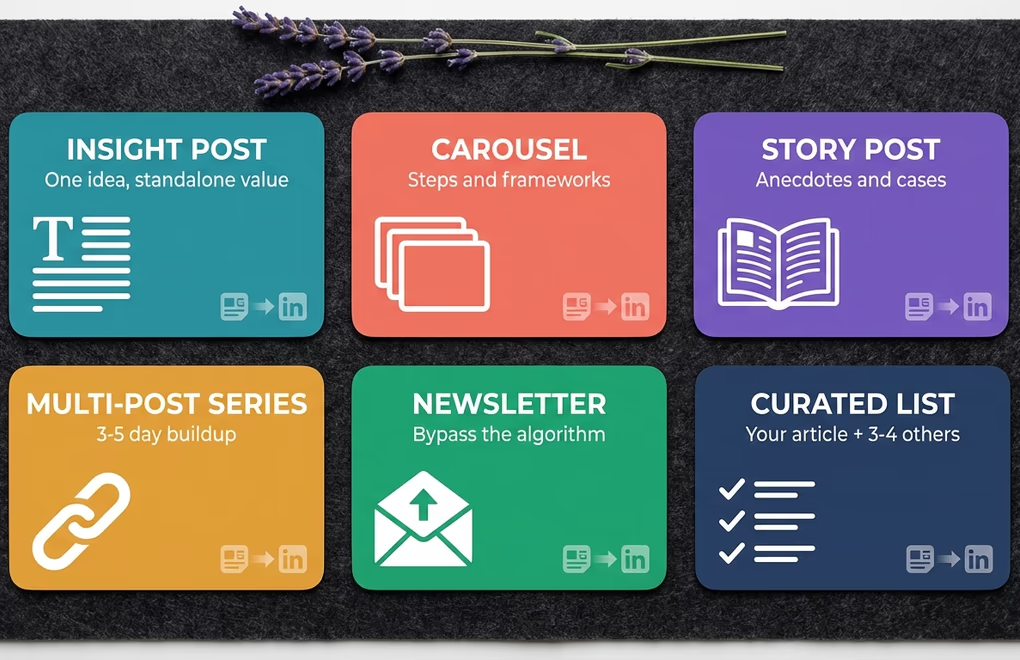
Standalone insight posts are the most reliable format because they are the simplest to create and the most natural to read. Open your blog article, find the one paragraph or section where you make your strongest, most specific, most counterintuitive point, and rewrite it as a 1,200 to 1,500-character LinkedIn post with a hook that stops the scroll. Use the free LinkedIn character counter to hit that range and see exactly where the "see more" cut lands, and the LinkedIn text formatter to bold the key phrases that anchor the post. A 2,000-word article typically contains three to five insights that each deserve their own post. The trick is treating each one as a completely independent piece of content - the reader should never feel like they are reading an excerpt.
Carousel posts from article frameworks are the highest-engagement option, and blog articles are perfect source material for them because listicles and how-to guides translate almost directly into slide-by-slide formats. Take your article's H2 headings and turn each into a slide with a headline and one key sentence of explanation. Your article titled "7 Ways to Improve Your LinkedIn Profile" becomes a 9-slide carousel - one hook slide, seven content slides, and a CTA slide - without writing a single new word beyond the hook.
Story posts from case studies and examples leverage the fact that blog articles often contain real-world anecdotes that get buried in the middle of a longer piece. If your article includes a client success story, a personal experience, or a before-and-after example, pull it out and restructure it as a standalone narrative post. Start with the conflict, build through the approach, and land on the outcome. Story posts generate the highest comment rates of any format because people relate to the struggle and want to share their own experiences.
Multi-post series work especially well for comprehensive blog articles that cover too much ground for a single LinkedIn post. Break the article into three to five connected posts published across consecutive days, each covering one section with a teaser for the next installment. By the final post in the series, your audience is invested enough in the topic that including a link to the full article feels like a natural conclusion rather than a promotional ask. The series format also gives the algorithm multiple chances to distribute your content, which means more of your audience sees at least one installment.
The remaining two formats - newsletter editions and curated reading lists - are less common but surprisingly effective. If you have a LinkedIn newsletter, republishing a condensed version of your blog post as a newsletter edition guarantees delivery to every subscriber through email, push notifications, and in-app alerts, completely bypassing the feed algorithm. And curated list posts, where you share four or five valuable resources on a topic and include your blog article among them, frame your content as one recommendation among several rather than a self-promotional pitch, which changes how both readers and the algorithm perceive it.
What zero-click traffic strategy actually works on LinkedIn?
The biggest challenge with blog-to-LinkedIn repurposing is that your ultimate goal - driving readers back to your website - conflicts directly with the way LinkedIn's algorithm works. Posts with external links in the body get significantly less distribution because LinkedIn wants users to stay on the platform. This is the same penalty that applies to YouTube links, and it means the most obvious approach - sharing your blog URL with a description - is also the worst-performing one. You need a smarter path from LinkedIn engagement to blog traffic.
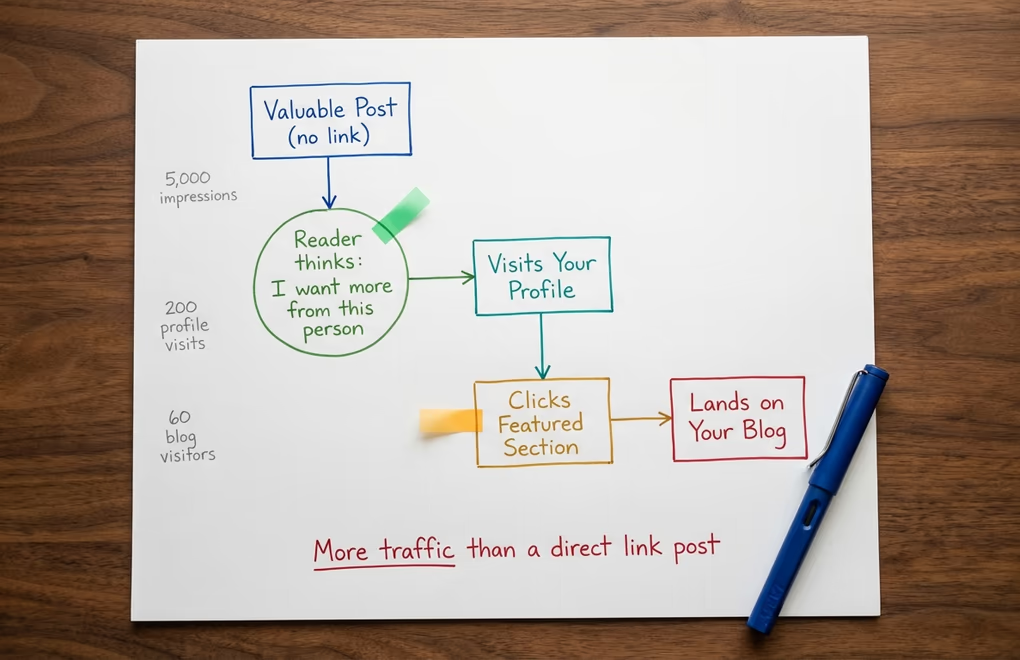
The zero-click approach flips the funnel. Instead of asking people to leave LinkedIn to read your blog, you give them complete value in the LinkedIn post itself and let curiosity do the rest. When someone reads a genuinely useful LinkedIn post and thinks "this person clearly knows their subject," their natural next action is to click on your profile to learn more about you. Your LinkedIn profile's Featured section is where you place links to your blog, your newsletter, and your most important resources. The traffic path becomes: valuable post, profile visit, Featured section click, blog landing page. It is one extra step compared to a direct link, but the readers who take that extra step are far more qualified and engaged than people who click a link out of mild curiosity.
The counter-intuitive result is that zero-click posts often drive more total blog traffic than link posts do. A link post with a 50 percent reach penalty might get 2,000 impressions and 40 clicks. A zero-click post on the same topic gets 5,000 impressions, generates 200 profile visits, and 60 of those people click through to the blog from the Featured section. You get 50 percent more blog visitors from the post that contained no link at all, plus significantly higher engagement numbers that build your audience for future posts. The math works because the reach advantage of a linkless post more than compensates for the extra friction of the profile visit step.
There are situations where you do want to include the blog link directly, and the safest approach is to add it as the first comment rather than in the post body. Finish your post with a line like "I wrote the complete guide on this with examples and templates - link in my first comment" and immediately comment with the URL. This keeps the post body clean for the algorithm while giving interested readers an easy path to the article. Just know that even the comment-link strategy generates less total reach than a purely zero-click post, so reserve it for your highest-value articles where the blog traffic justifies the trade-off.
What repurposing timeline maximizes total reach?
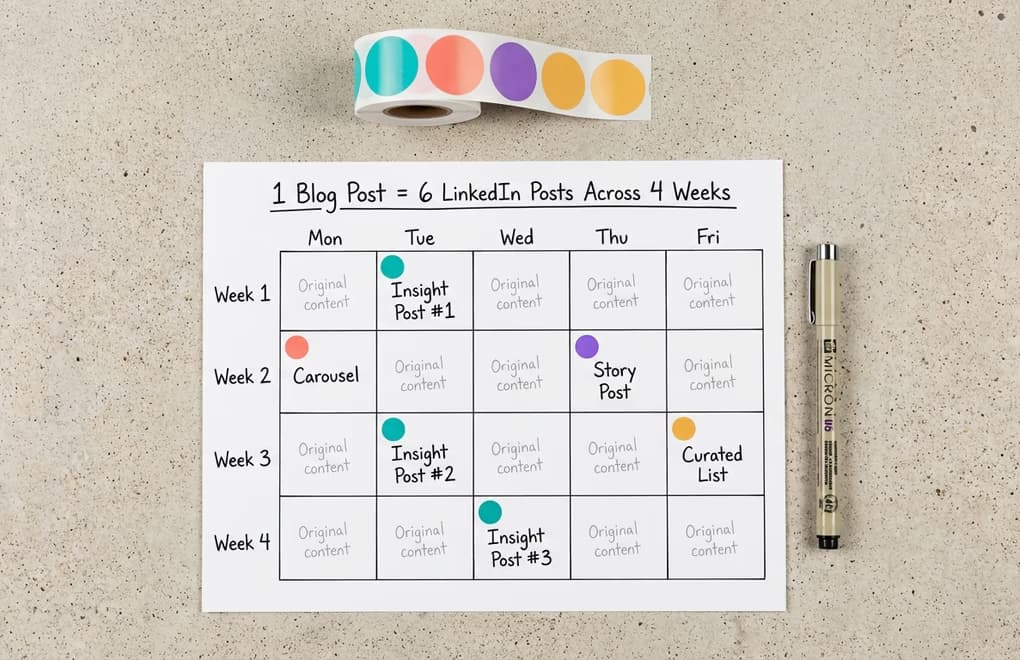
Dumping all your repurposed posts in the same week defeats the purpose of having a content backlog. The whole point is to extract maximum reach from one article over an extended period, and that means spacing your repurposed posts strategically so each one hits your audience at a different time and in a different format, giving the impression that you are publishing a steady stream of fresh insights rather than mining one article repeatedly.
The first three days after publishing your blog post are when you should share the single strongest insight as a standalone text post. This is the sharpest, most attention-grabbing idea in the article - the one that makes people stop scrolling and think. No link, no reference to the blog, just the insight formatted as a complete LinkedIn post with a strong hook. This builds early LinkedIn engagement around the topic while your blog post is still climbing search rankings.
During weeks two and three, roll out the higher-effort formats. A carousel version of the article's framework or steps, a story post from an anecdote buried in the article, and one or two additional insight posts from different sections of the piece. Space these across your regular posting cadence and mix them with original LinkedIn-first content so your feed does not feel like a blog promotion channel. Use LinkedGrow's scheduling to plan this out in advance during the same session where you write the original article.
From month two onward, the article moves into your evergreen rotation. Every blog post you have ever written is a potential source for future LinkedIn content. When you are running low on ideas for the week, go back to an article from three months ago and create a fresh carousel, a new insight post from a different angle, or include it in a curated list post. The LinkedIn audience that saw your first round of repurposed posts has churned significantly by then - new followers have joined who never saw the original content, and the people who did see it have forgotten the specifics. Repurposing old content is not lazy - it is smart distribution, and the best content marketers treat their blog archive as a permanent library of LinkedIn source material.
How do you extract LinkedIn posts from a blog article in 15 minutes?
The fastest path from blog article to a batch of scheduled LinkedIn posts starts with reading your article once with a specific lens: instead of reading for comprehension, you are reading for standalone moments. Every time you hit a sentence or paragraph that makes you think "this would stop someone's scroll if they saw it in their feed," highlight it. Those highlights are your posts. Most 1,500 to 2,000-word articles contain four to six of these moments.
LinkedGrow's blog-to-LinkedIn feature does this extraction automatically. Paste the blog URL and the AI analyzes the full article to identify the individual ideas, data points, and stories that would each work as independent LinkedIn posts. It generates hook options for each one and writes full post variations that you can edit and schedule directly. The entire workflow takes about 15 minutes, and you walk away with a week or more of content ready to publish.
Whether you use the tool or do it manually, the critical rule is that each LinkedIn post must work as a standalone piece of content. If a reader encounters your post with zero context - they have never read the blog article, they do not know who you are, they are scrolling between meetings - the post should still deliver a complete, valuable thought. The moment your LinkedIn post feels like an excerpt that requires external context to make sense, you have lost the reader and you have lost the algorithm, because people who scroll past without engaging are sending a negative signal that suppresses your distribution.
The Compounding Effect of Consistent Repurposing
When you repurpose every blog post you write, something interesting happens over time. Your LinkedIn content becomes more consistent because you always have material in the pipeline, which means you never face the blank-screen problem of needing to come up with something to post on a random morning. Your blog traffic grows because LinkedIn posts drive profile visits that lead to website clicks, creating a steady stream of visitors that supplements your organic search traffic. And your blog writing improves because you start thinking about which sections will make great LinkedIn posts while you are still outlining the article, which naturally pushes you toward sharper insights and more structured arguments.
The creators who build real audiences are not the ones who produce the most content from scratch - they are the ones who extract the most value from everything they create. One blog post per week, repurposed into five LinkedIn posts over three weeks, gives you a professional presence on both platforms with less total effort than publishing on either one alone. Start with your most recent article, pull out three standalone insights, generate posts from them, and schedule them across the next two weeks. That is the system, and once you see how much engagement it produces from content you already wrote, you will never share a bare link on LinkedIn again.
Frequently Asked Questions
Post the strongest single insight from your article as a standalone LinkedIn text post within the first few days. Wait two to three weeks before publishing a carousel or story version, and space additional repurposed posts across the following month. This prevents audience fatigue while maximizing the total reach from one article.
No. LinkedIn Articles get poor feed visibility and rarely match the engagement of regular posts. Instead, extract individual insights and reformat them as standalone LinkedIn posts, carousels, or story posts. Use LinkedIn Articles only for building a permanent library on your profile or capturing Google search traffic through LinkedIn's domain authority.
Yes, and you should. Evergreen blog content repurposes especially well because the insights are still relevant. Change the opening hook, update any data points to current numbers, and choose a different format than you used the first time. One old blog post can easily yield three to five fresh LinkedIn posts that feel completely new to your audience.
Use the zero-click approach: deliver complete value in the LinkedIn post itself without any link, and let interested readers visit your profile where your Featured section links to your blog. This builds more trust and drives more qualified traffic than a direct link because readers who take the extra step to visit your profile are genuinely interested.
A typical 1,500-word blog post yields five to seven LinkedIn posts across different formats: three to four standalone insight posts, one carousel from the article's framework or steps, one story post from an anecdote or case study, and one curated list post that includes the article alongside related resources.
Do not put a bare URL in the post body because LinkedIn suppresses external links in the feed algorithm. Instead, write the full value natively in your LinkedIn post, then add the blog link in the first comment. Alternatively, place the blog link in your Featured section and tell readers to check your profile. LinkedGrow's blog-to-LinkedIn feature generates the native post copy automatically so you can focus on distributing the article without triggering the link penalty.
LinkedIn does not formally penalize them, but posts with outbound links receive significantly less algorithmic distribution than native text or carousel posts. Internal data from creators consistently shows 40 to 60 percent lower reach when a link appears in the post body. The workaround is the first-comment strategy or the profile Featured section approach described in this guide.
The post you keep meaning to write takes four minutes here.
LinkedGrow turns a link, a video or a rough idea into a LinkedIn post written in your own voice, then puts it in the calendar for the morning your audience is awake.
Start free for 7 days