You spent four hours filming, editing, and uploading a YouTube video. It got 800 views in the first week and then the algorithm moved on to something newer. Meanwhile, the insights in that video - the frameworks, the stories, the data you collected - are sitting on YouTube doing nothing for you on the platform where your professional audience actually lives. The gap between the effort you put into video content and the value you extract from it is enormous, and learning how to repurpose YouTube videos into LinkedIn posts that get engagement is how you close it. LinkedGrow's YouTube-to-LinkedIn feature automates this process, but understanding the strategy behind it will make every piece of repurposed content perform better.
The math is compelling once you see it clearly. A single 15-minute YouTube video contains enough raw material for 8 to 12 separate LinkedIn posts, each formatted for the way professionals consume content in their feed. That means one afternoon of video creation can fuel two to three weeks of LinkedIn content without you needing to come up with a single new idea. You are not copying your video and pasting it on LinkedIn - you are extracting the most valuable moments and repackaging them in formats that actually work on a platform where people scroll in 30-second bursts between meetings.
This guide covers the seven specific formats for turning video content into LinkedIn posts, why you should never put a YouTube link in your post body, how to build an efficient repurposing workflow that takes minutes instead of hours, and the native video specs that make the difference between a clip people watch and one they scroll past.
Why is video-to-LinkedIn repurposing the highest-ROI content strategy?
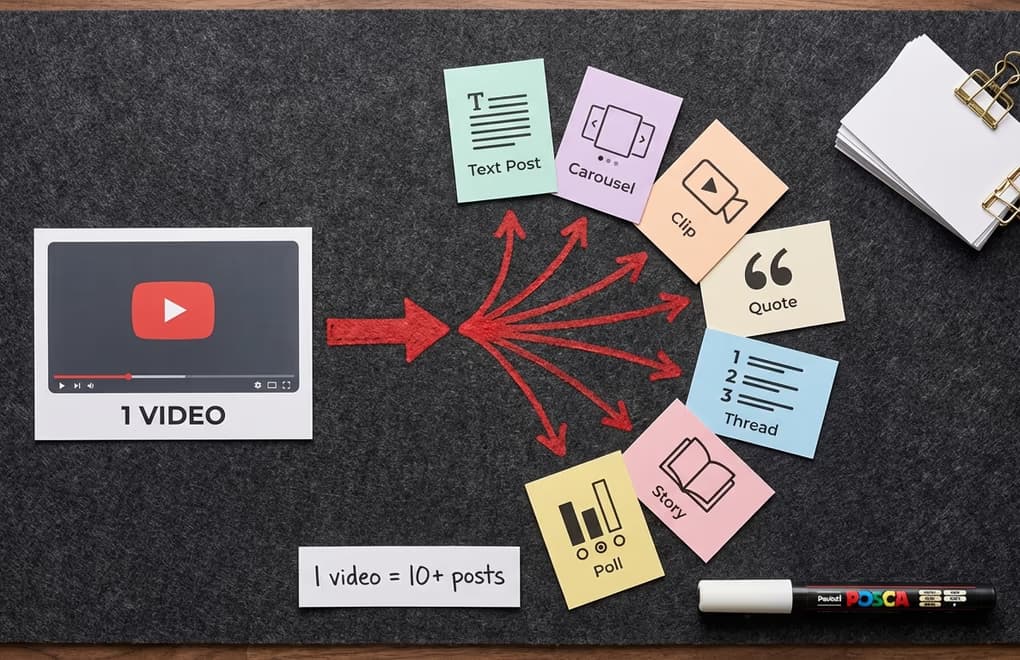
The fundamental problem with YouTube content is that it requires a significant time commitment from the viewer. Someone needs to click, load a new page, and watch for 10 to 20 minutes. On LinkedIn, people are scrolling between tasks, during commutes, and in the three-minute gaps between meetings. They want valuable insights delivered in the time it takes to drink a sip of coffee, not a 15-minute deep dive they need to bookmark for later. When you repurpose video into LinkedIn-native formats, you are converting long-form depth into the snackable insights that actually match how professionals consume content during their workday.
There is also an audience overlap issue that most creators underestimate. Your YouTube subscribers and your LinkedIn connections are largely different groups of people. The engineer who follows your YouTube channel for technical tutorials may not be connected to you on LinkedIn, and the CMO who engages with your LinkedIn posts may have never visited your YouTube channel. Repurposing is not showing the same people the same content twice - it is reaching entirely new audiences with ideas they would never have discovered otherwise. You are doubling the return on every hour you spend creating video without doubling the creative effort.
And here is the part that makes this strategy genuinely unfair: LinkedIn's algorithm does not penalize content that originated on another platform. There is no "duplicate content" detection between YouTube and LinkedIn. A well-written text post that was inspired by your latest video performs identically to a post written from scratch, as long as it follows LinkedIn's formatting best practices and drives genuine engagement. The algorithm cares about how people interact with your post, not where the idea came from. This means you can repurpose aggressively without worrying about any kind of reach suppression.
Which 7 formats turn one video into a week of LinkedIn content?
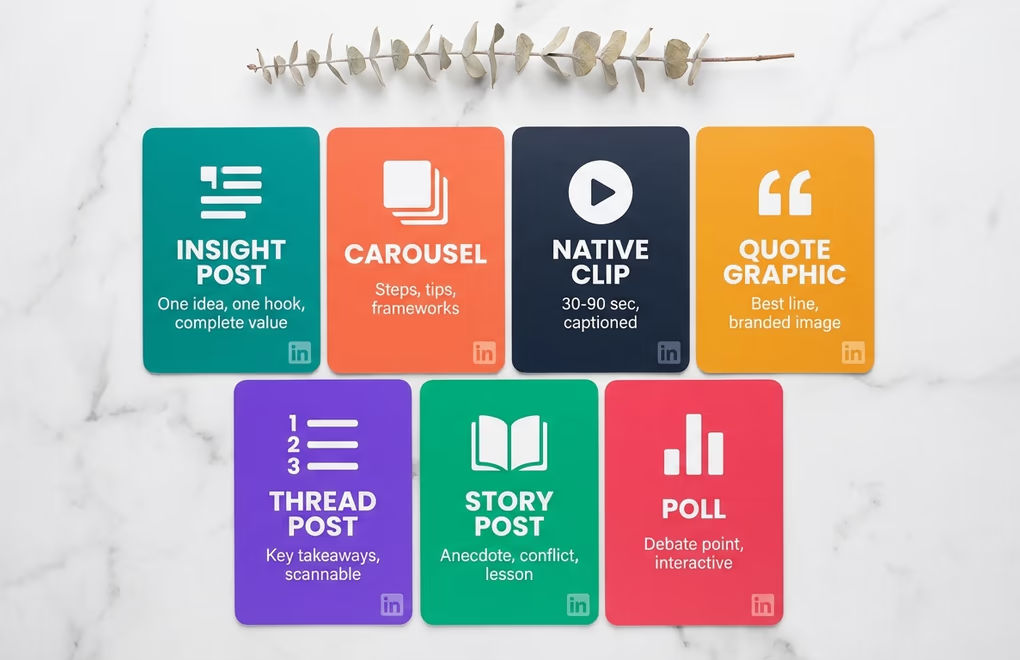
The mistake most people make when repurposing is thinking of it as "summarizing the video for LinkedIn." A summary is boring - it is a watered-down version of the original that gives people a reason NOT to watch the video because they feel like they already got the gist. Effective repurposing means extracting individual ideas from the video and turning each one into a self-contained LinkedIn post that delivers complete value on its own, without the reader needing to watch anything else. Here are the seven formats that work best.
Standalone insight posts are the simplest and most versatile format. Pull one compelling idea, framework, or data point from your video and write it as a complete text post with a strong hook, a body that explains the concept, and a closing that invites discussion. A 15-minute video easily contains five to seven insights that each deserve their own post. The key is choosing ideas that work independently - the reader should not need any context from the video to find the post valuable.
Carousels from frameworks and step-by-step processes are the highest-engagement option because the swipeable format naturally mirrors the sequential structure of most educational video content. If your video walks through a 7-step process, that translates directly into a 9-slide carousel - one hook slide, seven content slides with one step each, and a CTA slide. Carousels earn the highest engagement rate of any LinkedIn format, and the swipe-through mechanic generates the dwell time that the algorithm rewards with broader distribution.
Native video clips under 90 seconds let you bring the energy and personality of your video directly into the LinkedIn feed. The trick is identifying the single most compelling 30 to 90-second segment - the moment where you make your strongest point, tell the most relatable story, or reveal a surprising insight. Cut it clean, add captions (since the vast majority of LinkedIn video is watched on mute), and upload it directly to LinkedIn as a native file rather than sharing a YouTube link. We will cover why native uploads matter enormously in the next section.
Story-format posts from video anecdotes work beautifully because video content tends to include personal stories, client examples, and real-world situations that make great standalone narratives on LinkedIn. If you told a two-minute story in your video about a mistake you made or a lesson you learned, rewrite it as a text post that starts with the conflict, builds tension, and delivers the resolution. Story posts consistently rank among the highest-engagement formats because they trigger emotional responses that lead to longer comments.
The remaining three formats - numbered list posts, quote graphics, and polls - round out your repurposing toolkit. A list post condenses the video's key takeaways into a scannable numbered format. A quote graphic takes your most memorable sentence from the video and turns it into a branded image post. And a poll converts a debatable point from the video into an interactive question that drives massive reach through the engagement mechanics LinkedIn's algorithm loves. Together, these seven formats mean a single video can fuel your LinkedIn content for two to three weeks without repeating yourself.
Why should you never put a YouTube link in your LinkedIn post body?
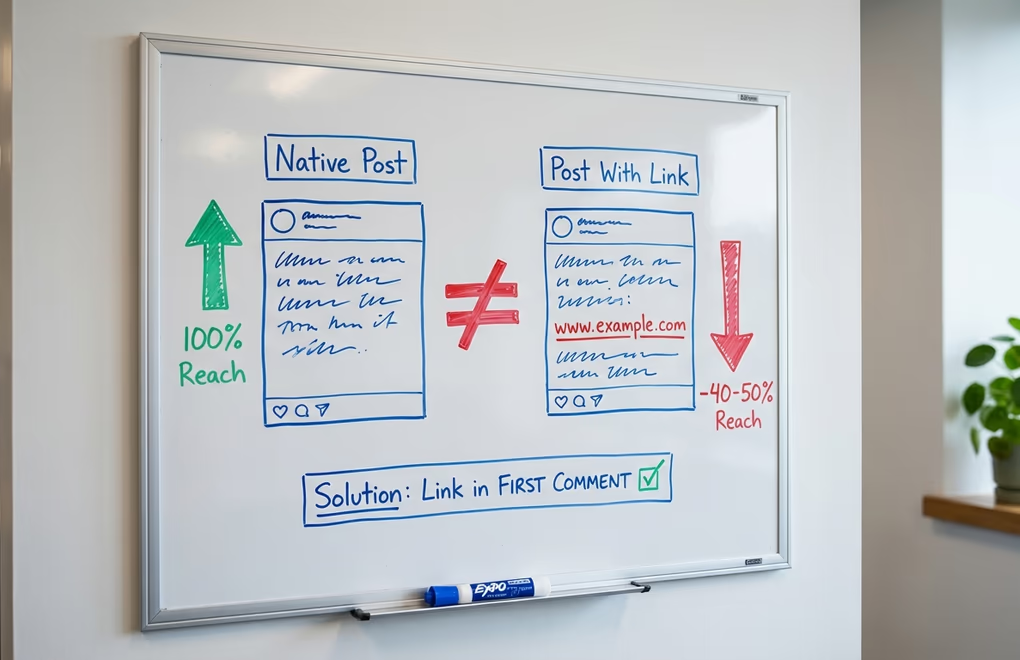
This is the single most important technical detail in the entire YouTube-to-LinkedIn strategy, and getting it wrong will undermine everything else you do. LinkedIn significantly reduces the reach of posts that contain external links in the body. The platform wants users to stay on LinkedIn, and a post that sends people to YouTube is working against that goal. Independent analysis of over a million posts consistently shows that posts with external URLs get roughly 40 to 50 percent less distribution than equivalent posts without links. That is not a marginal difference - it is nearly half your potential audience that you lose by including a YouTube link.
The workaround that every successful LinkedIn creator uses is simple: post your content with no link in the body, then immediately add the YouTube URL as the first comment. Finish your post text with a line like "Full video breakdown in comments" or "Link to the full episode in the first comment" so readers know where to find it. Links in comments do not trigger the same reach penalty as links in the post body, so you get the full algorithmic distribution of a native post while still giving interested readers a path to the video.
The same principle applies to native video clips versus YouTube link embeds. When you upload a video file directly to LinkedIn, it autoplays as people scroll past, the algorithm treats it as native content, and there is no reach penalty. When you paste a YouTube URL, it renders as a tiny thumbnail with a play button that requires a full page redirect to YouTube - and people rarely click it because it means leaving the app they are currently using. Native video uploads generate roughly three to five times more views than a YouTube link post. If you are going to use video clips from your YouTube content on LinkedIn, always download the clip and upload it as a native file.
What is the 30-minute video repurposing workflow?
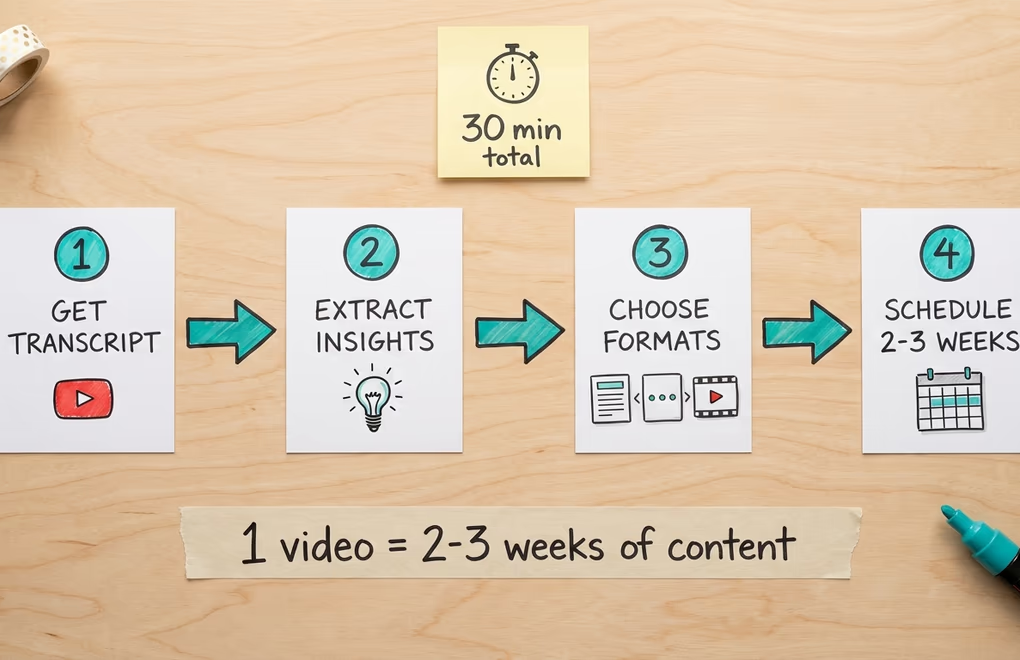
The reason most people never repurpose their video content is that it feels like starting from scratch - you watch the video, take notes, and then write completely new posts, which can take almost as long as creating original content. The way to make repurposing sustainable is to have a system that reduces the work to about 30 minutes per video, regardless of how long the original is. Two free utilities save time in the final formatting pass: the LinkedIn character counter for trimming posts to fit before the "see more" cutoff, and the LinkedIn text formatter for bolding the punchy lines extracted from the transcript.
Step one: get a transcript. Every YouTube video has an auto-generated transcript you can access by clicking "Show transcript" below the video. Copy the entire thing - it takes about 10 seconds. For cleaner output, tools like Descript or Castmagic will give you a timestamped, speaker-labeled transcript that is easier to work with, but the free YouTube transcript works perfectly fine for most repurposing needs.
Step two: extract the standalone insights. This is where LinkedGrow's YouTube-to-LinkedIn feature shines. Paste the video URL and the AI analyzes the content to identify the individual ideas, stories, frameworks, and data points that would each work as an independent LinkedIn post. It generates hook options for each one and writes full post variations that you can edit and publish directly. Those variations read like you once you train the AI to write in your voice, so the editing pass stays light instead of a full rewrite. Without the tool, you can do this manually by reading through the transcript and highlighting every sentence where you shared something that would make someone pause and think "I should write that down." Those moments are your posts.
Step three: choose your formats. Not every insight works in every format. A step-by-step process becomes a carousel. A personal anecdote becomes a story post. A surprising statistic becomes a text post with a bold hook. A controversial opinion becomes a poll. Match each extracted insight to the format that gives it the most impact, and you will end up with a diverse content mix that keeps your audience engaged across the week rather than seeing the same style of post every day.
Step four: schedule across two to three weeks. Do not publish all your repurposed content in the same week - it defeats the purpose of having a backlog. Use LinkedGrow's scheduling feature to spread the posts across your regular posting cadence, mixing repurposed content with original LinkedIn-first ideas so your feed feels varied. The beauty of this system is that a single batch session after each video gives you weeks of content runway, which means you never face the blank-screen panic of needing to come up with something to post on a random Tuesday morning.
What native video specs work best for LinkedIn clips?
If you are going to use video clips as part of your repurposing strategy, the technical details matter because they directly affect whether the algorithm gives your clip a chance or buries it. LinkedIn supports native videos up to 15 minutes, but the optimal length for a feed clip is under 90 seconds. Shorter clips have dramatically higher completion rates, and completion rate is one of the signals the algorithm uses to decide whether to show your video to more people. A 45-second clip that 70 percent of viewers watch to the end will outperform a 3-minute clip that most people abandon after 30 seconds.
Format matters more than most people realize. Vertical video (9:16) or square (1:1) takes up significantly more screen real estate on mobile than horizontal (16:9), and since the majority of LinkedIn browsing happens on phones, more screen space means more attention and longer viewing times. If your YouTube video is horizontal, crop or reframe your clips to vertical or square before uploading to LinkedIn - the LinkedIn video size guide covers every supported resolution and aspect ratio. The extra two minutes of editing is worth the difference in how much of the feed your clip occupies when someone scrolls past it.
Captions are not optional. LinkedIn videos autoplay silently in the feed, and people scrolling during work hours, commutes, or meetings are not going to turn on their sound to listen to your clip. If your message only comes through in audio, you have lost the majority of your potential audience before they even engage. Burn captions directly into the video file or upload an SRT subtitle file alongside your video. Make the caption text large enough to read comfortably on a phone screen - 24-point minimum - and use a semi-transparent background behind the text so it remains legible regardless of what is happening in the video frame behind it.
How do you build a YouTube-to-LinkedIn content waterfall?
The content repurposing approach works because it flips the typical content creation model from "create something new every day" to "create one thing deeply and distribute it everywhere." Your YouTube video is the source material at the top of the waterfall, and everything that flows from it - text posts, carousels, clips, quote graphics, polls, story posts - reaches audiences that the original video never would have touched. The effort-to-output ratio is so favorable that once you build this habit, going back to creating every LinkedIn post from scratch will feel absurd.
Start with your next video. Before you even publish it on YouTube, open the transcript and run it through LinkedGrow's AI post generator or manually pull out five to seven insights. Write the posts while the content is fresh in your mind, schedule them across the next two weeks, and watch your LinkedIn engagement grow while your content creation time actually decreases. That is the power of repurposing done right - more reach, less effort, and a professional presence on LinkedIn that looks effortless because the system behind it handles the hard part.
Frequently Asked Questions
No. LinkedIn's algorithm does not detect or penalize content that originated on another platform. What matters is whether the LinkedIn post itself is well-formatted, drives engagement, and keeps people on the platform. A text post derived from a YouTube video performs identically to a post written from scratch as long as the quality and formatting match.
Never put the YouTube link in the post body because external URLs significantly reduce your post's reach on LinkedIn. Instead, post your content as standalone value with no link, then add the YouTube URL as the first comment. Mention 'link in comments' at the end of your post so people know where to find the full video.
A single 15-minute YouTube video typically yields 8 to 12 LinkedIn posts across different formats: five to seven standalone text posts from individual insights, one or two carousels from frameworks or step-by-step processes, one or two native video clips of the most compelling moments, and a poll or question post from a debatable point in the video.
Always upload clips directly to LinkedIn as native video. Native uploads autoplay in the feed and receive full algorithmic distribution, while YouTube links show as a small thumbnail and get penalized for sending users off-platform. Native video generates roughly three to five times more views than a YouTube link post.
Keep clips under 90 seconds for LinkedIn feed posts. Shorter clips have higher completion rates, which is a strong positive signal for the algorithm. Always add captions since the vast majority of LinkedIn video is watched without sound, especially on mobile during work hours.
The post you keep meaning to write takes four minutes here.
LinkedGrow turns a link, a video or a rough idea into a LinkedIn post written in your own voice, then puts it in the calendar for the morning your audience is awake.
Start free for 7 days