
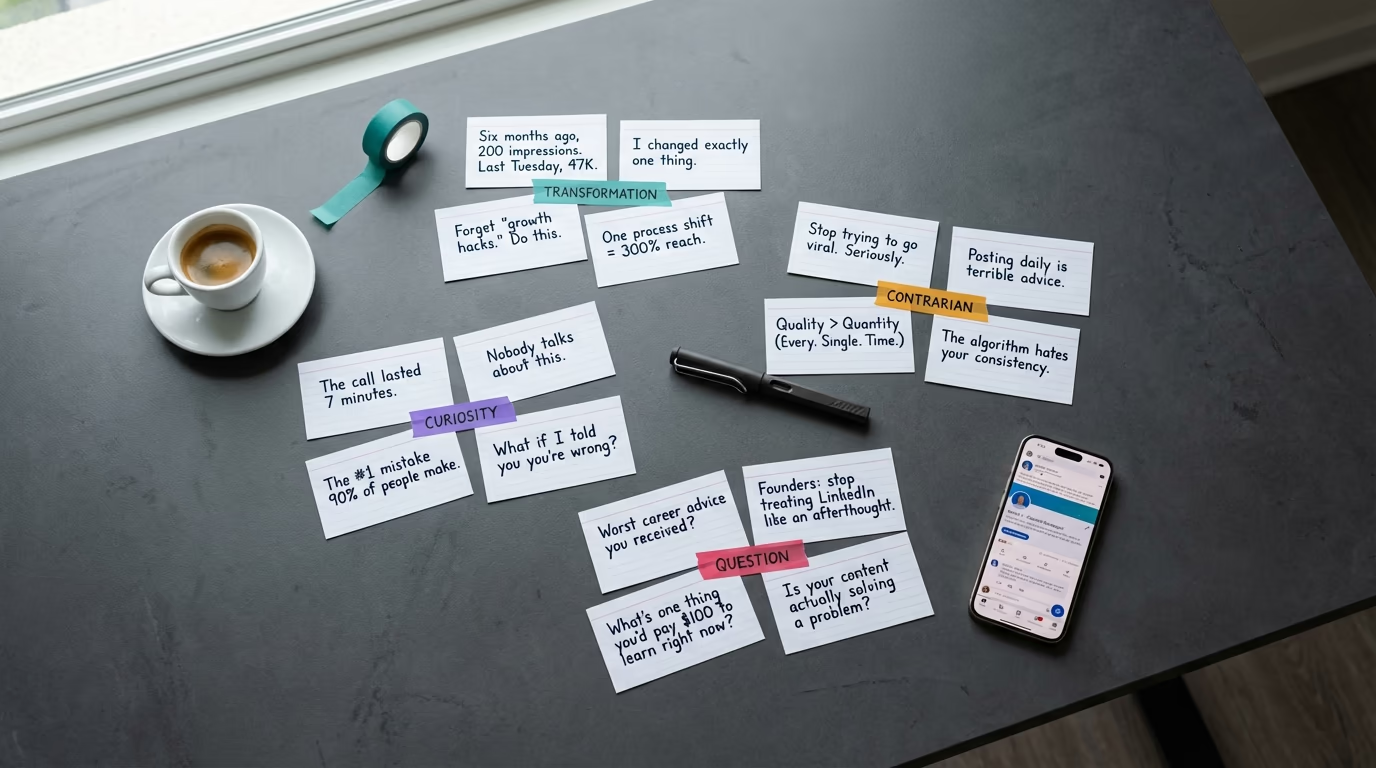
You have read the advice about writing great hooks. You understand that the first line matters more than anything else in your post. And yet, every time you sit down to write, you stare at the blinking cursor on line one and nothing comes. The problem is not that you lack understanding of what a hook should do - it is that you lack a library of proven examples to draw from when you need one. This article is that library. These are the best LinkedIn hook examples and proven formulas that stop the scroll, pulled from posts that actually earned massive engagement on the platform, organized by type so you can find the right style for whatever you are writing today. If you have already read LinkedGrow's complete guide to writing LinkedIn hooks, which covers the psychology and theory behind why hooks work, consider this the practical companion: fewer explanations, more examples, and fill-in templates you can start using in your next post.
What makes this collection different from generic hook lists is that every example here is designed around a concept most people miss entirely: the rehook. Your hook is line one - the thing that stops the scroll. But line two, the rehook, is what slams the door behind the reader and makes them commit to clicking "See more." Both lines work together, and the examples below show you both pieces for every formula, because a hook without a rehook is only doing half the job. LinkedGrow's hook generator can produce dozens of hook-rehook pairs in seconds if you want to accelerate the process, but the formulas here work just as well when you write them by hand.
Before we get into the examples, here is the one rule that matters most: the promise in your hook must be delivered by the body of your post. A dramatic opening followed by generic advice is not a hook - it is a bait-and-switch, and your audience will punish you for it by disengaging the next time they see your name in their feed. Every formula below is paired with notes on what kind of content should follow it, so you never create that disconnect.
What appears before the LinkedIn "see more" cutoff?
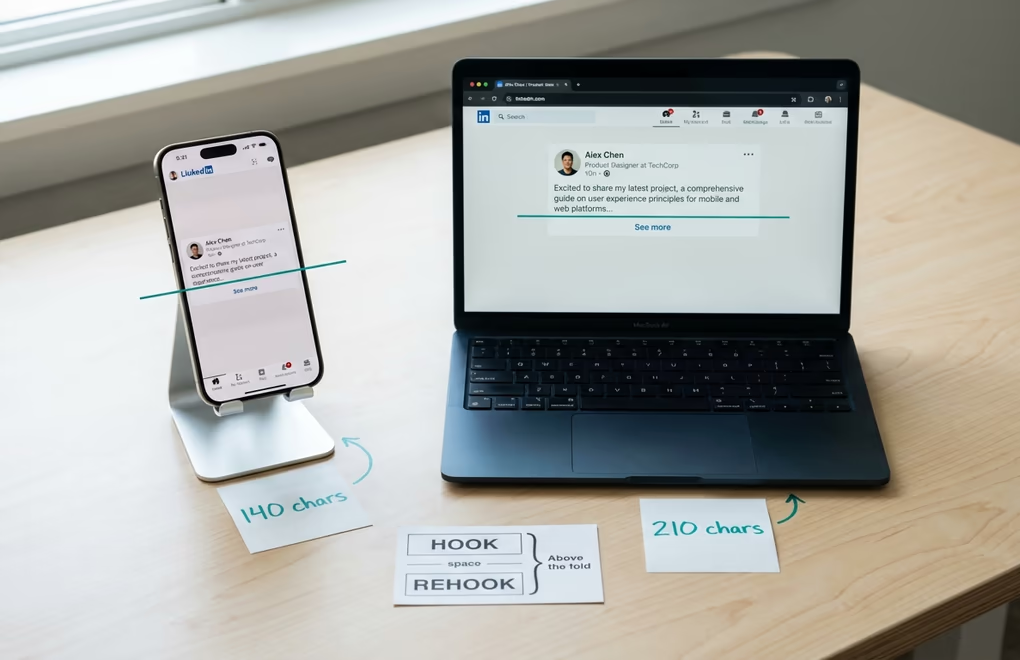
Before diving into examples, you need to understand exactly how much real estate you are working with. LinkedIn truncates your post after the first few lines and hides the rest behind a "See more" link. On mobile, roughly 140 characters are visible before truncation. On desktop, that expands to about 210 characters. The practical implication is that you should treat 140 characters as your absolute ceiling for the hook line, because you want the full hook to land on every device. Anything beyond 140 characters risks being cut mid-sentence on a phone, which kills the tension you are trying to create.
The ideal structure for what appears above the fold is three elements: the hook, a blank line, and the rehook. The hook is your first sentence - short, specific, and loaded with either curiosity or tension. The blank line creates visual breathing room and signals to the reader that this is a structured post worth reading, not a wall of text. The rehook is the second visible sentence that eliminates the main objection or adds a second layer of intrigue. When someone reads your hook and thinks "that sounds interesting but probably doesn't apply to me," the rehook is what dismantles that assumption and converts them from a scanner to a reader. Together, these two lines are the highest-leverage writing you will do on the entire platform, because they determine whether the other 2,900 characters you wrote get seen at all.
One structural detail that most people get wrong: line breaks count toward your visible character limit. If you use two line breaks between your hook and rehook, you are eating into your available space. A single blank line between hook and rehook is the standard that works best for keeping both lines above the fold on mobile. Some creators skip the blank line entirely and use a period or dash to separate the two lines, which gives them slightly more room for longer hooks, but the visual clarity of the blank line is usually worth the character trade-off.
How do transformation and result hooks lead with proof?
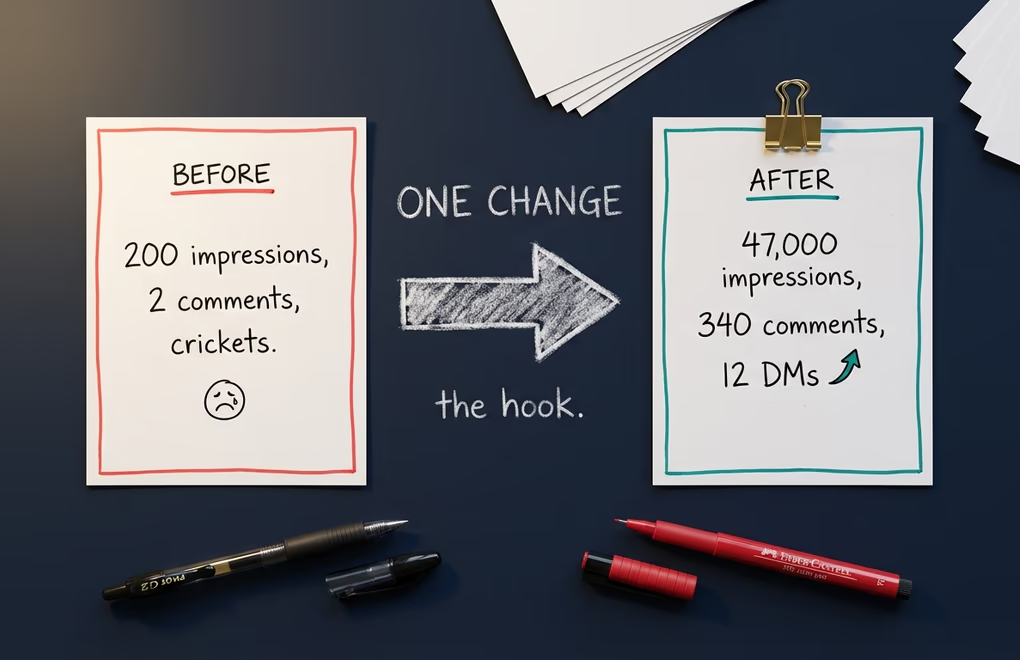
Transformation hooks work because they compress time and create an implicit promise: you went from a bad state to a good state, and the reader can do it too if they keep reading. The key to making these hooks effective is specificity. "I grew my business" is forgettable, but "I went from 200 impressions per post to 14,000" creates a concrete gap the reader wants to close. The body of a transformation post should always explain the specific change that caused the result, not just celebrate the outcome. Here are the formulas and examples.
The timeframe compression formula is one of the most reliable transformation hooks because it anchors the change to a specific window: "[Time] ago, [bad state]. Today, [good state]." An example hook-rehook pair looks like this: "Six months ago, my posts averaged 200 impressions. Last Tuesday, one hit 47,000." followed by the rehook "I changed exactly one thing about how I write." The hook establishes the gap and the rehook promises a specific, singular insight, which makes the reader feel like the answer will be concise and actionable rather than a vague lecture. Another variation: "In January, I had 400 LinkedIn followers. I just crossed 11,000." with the rehook "It wasn't about posting more." That rehook works because it preemptively kills the obvious assumption that the answer is just volume.
The specific result formula leads with one impressive number and immediately attributes it to one action: "[Number] [result]. From [one action]." For example: "47 inbound leads. From one LinkedIn post." followed by "Here is exactly what I did differently from every other post I have written." Or: "We cut our sales cycle from 45 days to 19." with the rehook "The change had nothing to do with our sales team." The power of this formula is that it promises specificity. The reader knows they are going to get a concrete explanation, not a motivational platitude. Use transformation hooks for posts where you have a real result to share - case studies, campaign outcomes, personal milestones, or client success stories. If you do not have a genuine result behind the hook, pick a different formula, because readers will feel the emptiness immediately.
The fill-in templates you can start using today: "[Time period] ago, I [struggled with specific thing]. Today, [specific positive outcome]." Rehook: "[One sentence that eliminates the obvious assumption]." Another template: "[Exact number] [specific result]. [One sentence explaining the single action]." Rehook: "Here is the framework anyone can steal." And a third variation for career posts: "I [negative career event]. Best thing that ever happened." Rehook: "Here is why I would do it again." If you are announcing a new role, our LinkedIn new job announcement templates include hooks designed specifically for that moment.
How do contrarian and myth-busting hooks work?
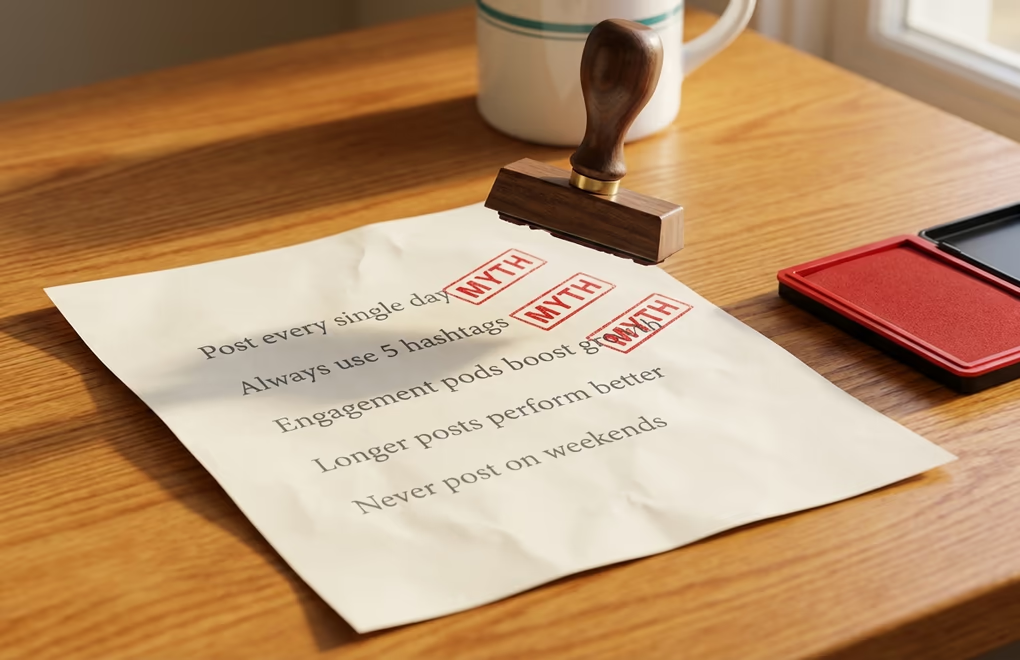
Contrarian hooks generate the most comments of any formula type because they trigger disagreement, curiosity, and the desire to know whether you can actually back up such a bold claim. The LinkedIn algorithm treats comments as one of the strongest engagement signals, which means contrarian posts get amplified not just because people feel compelled to respond but because the algorithm reads all that debate as high-quality content worth distributing more broadly. The catch is that your contrarian take needs to be genuine and defensible. Making an outrageous claim just to provoke comments without actually believing what you wrote will damage your credibility faster than any other mistake on the platform.
The bold reversal formula takes something people accept as true and flips it: "[Common advice] is terrible advice. Here is why." Example: "Stop trying to go viral. Seriously." Rehook: "The creators who grow fastest are not chasing virality. They are doing something much quieter." Another: "Posting daily is the worst LinkedIn advice I keep seeing." with "The data shows the opposite of what most gurus claim." The rehook in a contrarian post should always hint at evidence rather than just doubling down on the claim, because a contrarian hook without any signal that you have proof behind it reads as attention-seeking rather than insightful.
The confession reversal formula adds a personal dimension by admitting you once believed the thing you are now arguing against: "I used to [believe/recommend X]. I was wrong." Example: "I used to tell every client to post five times a week. I have completely reversed that advice." Rehook: "Here is what three years of data taught me." Or: "Everything I believed about cold outreach was backwards." with "The approach that actually works feels counterintuitive." The confession adds credibility because it shows you have evolved your thinking based on experience rather than just disagreeing to be different. This formula works exceptionally well for coaches and consultants because it demonstrates intellectual honesty, which is exactly what potential clients are looking for when evaluating whether to hire someone.
The myth-buster formula directly names a belief and labels it false: "You don't need [common belief] to [achieve result]." Example: "You don't need to post every day to grow on LinkedIn." Rehook: "Three posts per week outperform seven when you get the quality right." Another: "More followers will not fix your engagement problem." with "A 2,000-follower account with the right strategy outperforms most accounts ten times its size." The templates: "[Common belief] is overrated. Here is what actually matters." Or: "[Popular tactic] stopped working in 2026. Here is what replaced it." Rehook: "The shift happened faster than anyone expected."
How do curiosity-gap and story hooks make readers click?

Curiosity gap hooks exploit a simple quirk in how human brains process information: when you know part of a story but not the resolution, your brain treats the missing piece as an open loop that demands closure. You cannot not click "See more" because leaving the loop open feels uncomfortable. This is the same mechanism that keeps you watching a TV show past midnight when you have work the next morning, and it is absurdly effective in a LinkedIn post. The trick is creating the gap without being so vague that the reader cannot tell whether the answer will be worth their time, because there is a thin line between curiosity and confusion, and confusion just gets scrolled past.
The incomplete story formula drops the reader into a specific moment and then stops: "[Specific scene or moment]. [What happened next changed everything]." Example: "The call lasted 7 minutes. I knew by minute 2 it was over." Rehook: "What she said next changed how I run every client meeting." Another: "I was sitting in the parking lot, staring at the rejection email on my phone." with "That afternoon turned into the best thing that happened to my career." Story hooks work because they engage the narrative processing centers of the brain rather than the analytical ones, which means the reader is emotionally invested before they even consciously decide to keep reading. The body of a story hook post must actually deliver the story, including specific details, dialogue, and a genuine insight at the end. A story hook that leads to generic advice feels like being promised a novel and handed a pamphlet.
The open loop formula teases information without revealing it: "Nobody talks about [this specific thing]." Example: "Nobody talks about the ugly middle stage of building a personal brand." Rehook: "Months 3 through 8 are where almost everyone quits." Or: "Before you post that carousel, read this." with "One small detail in the first slide determines whether anyone swipes." The open loop works particularly well when paired with LinkedIn post templates because you can build the loop into a repeatable structure you use across multiple posts with different topics.
The "How I" formula - and this is important - always outperforms "How to" because the personal framing makes the promise feel real rather than theoretical. "How I landed 12 clients from LinkedIn in 90 days" is more compelling than "How to land clients from LinkedIn" because the first version tells you it actually happened. The template: "How I [achieved specific result] without [common obstacle]." Rehook: "[One sentence that hints at the unconventional method]." Example: "How I built a 10K audience in 6 months without posting daily." Rehook: "The strategy goes against every growth guru on this platform."
How do question and direct-address hooks pull specific readers in?

Question hooks serve a different purpose than transformation or curiosity hooks. Where those formulas optimize for "See more" clicks and readership, question hooks are designed to generate comments, which is the engagement signal that carries the most weight in LinkedIn's algorithm. A well-crafted question makes readers feel like their answer matters, which means they leave a comment instead of just reading and scrolling on. The best question hooks are ones where the reader has an immediate opinion and can answer without needing to think for longer than five seconds, because every second of deliberation increases the chance they just scroll past instead of engaging.
The opinion question formula asks for a judgment call: "What is the [best/worst] [professional topic] you have ever [experienced]?" Example: "What is the worst career advice you have ever received?" Rehook: "I will go first. Mine was 'just be patient and your time will come.'" That rehook is critical because answering your own question first lowers the barrier for everyone else. Nobody wants to be the first commenter on a bare question, but once the author has set the tone with their own answer, others feel invited to contribute. Another example: "If you could only use one LinkedIn feature for the next year, which would it be?" with "I already know my answer and I bet most of you will disagree." That rehook adds a layer of competitiveness that drives even more responses.
The direct address formula names a specific audience by role, which makes it feel personally relevant to anyone in that group: "[Role/title]: [command or observation]." Example: "Founders: stop treating LinkedIn like an afterthought." Rehook: "Your personal brand is your company's cheapest marketing channel and you are leaving it empty." Or: "Freelancers, this is how you stop undercharging." with "The problem is not your rates. It is how you frame the conversation." Direct address hooks work especially well for agencies and consultants creating content for specific audience segments, because LinkedIn's algorithm now does a better job distributing content to people whose profiles match the audience being addressed. When you write "Founders:" as your opening word, the algorithm takes that as a signal about who should see the post.
The templates for this category: "[Role]: [the one thing you are getting wrong about X]." Rehook: "[Why it is costing you more than you realize]." And: "What [specific professional question] keeps you up at night?" Rehook: "I will go first - mine is [your honest answer]." A third variation combines both approaches: "[Role], I need to ask you something." Rehook: "[Specific question about their daily challenge]." Mix question hooks into your content calendar at least once per week because they generate the comment volume that tells the algorithm your posts are conversation starters worth distributing widely.
Why should you write your LinkedIn hook last?
The biggest mistake people make with these formulas is trying to use them before they know what the post is actually about. They pick a hook formula, write a dramatic opening line, and then try to reverse-engineer a post body that justifies the promise. This almost always produces one of two failures: either the body feels thin and forced because it was written to serve the hook rather than to deliver genuine value, or the hook and body feel disconnected because the real insight only emerged halfway through writing and the hook was pointing in a different direction. The fix is counterintuitive but transformatively effective: write the entire post first, identify the single most valuable insight in it, and then write a hook that teases that specific insight.
This approach works because the best hooks are accurate trailers for the content that follows. When you write the body first, you discover what the post is really about, which is often not what you thought when you started. Maybe you sat down to write about content calendars and realized midway that the actual insight is about why batching eliminates decision fatigue. The hook you write after that discovery will be sharper and more specific than anything you could have crafted before writing the body, because now you know exactly what promise you need to make and you know you can deliver on it. LinkedGrow's hook generator is particularly useful at this stage because you can paste in the finished body and have it suggest hooks that are actually aligned with the content, rather than generating hooks in a vacuum.
The practical workflow looks like this: write your post body in full, read it back, and underline the single sentence that made you think "that is the real point." Then take that sentence and convert it into one of the formulas from this article. If the core insight is a result you achieved, use a transformation hook. If it is a belief you are challenging, use a contrarian hook. If it is a story, use a curiosity gap. The formula you choose is determined by the content, not the other way around, which means you will never create that uncomfortable disconnect where the hook writes a check the body cannot cash.
One final technique that top creators use: write three to five hook options for every post, then pick the strongest one. The first hook you write is almost never the best one. It is the most obvious one, which means it is also the version closest to what everyone else would write. By forcing yourself to generate multiple options, you push past the obvious into territory that feels fresh and specific. The time investment is about three extra minutes, and the difference in engagement is significant enough that it becomes a non-negotiable part of your writing process once you see the results. If you want to see how different hooks land in practice, preview your post before publishing to check exactly how the hook and rehook appear above the fold on both mobile and desktop.
Frequently Asked Questions
Keep your hook under 140 characters to ensure the full line is visible on both mobile and desktop before the See More cutoff. Mobile devices show roughly 140 characters while desktop shows around 210, so optimizing for the smaller screen guarantees your hook lands intact regardless of how someone is reading their feed.
Statement hooks tend to generate more impressions because they deliver immediate value and create tension that pulls readers forward. Question hooks generate more comments because they invite direct participation. Use statement hooks when you want reach and question hooks when you want conversation and engagement in the comments section.
Write it last. Draft the full body of your post first so you understand the core insight, then go back and write a hook that accurately teases that specific value. Writing the hook first often leads to a disconnect where the opening promises something the body does not deliver, which readers notice immediately.
Rotate between four to six formulas to keep your feed feeling fresh without overwhelming yourself with options. If you use the same formula every post, your regular readers develop pattern blindness and start scrolling past your content automatically. Variety keeps the opening line unpredictable and worth stopping for.
Yes, as long as you space them at least three to four weeks apart and change the topic completely. The formula can repeat but the specific words and subject should feel new. Your audience remembers patterns more than exact words, so rotating the same formula across different subjects keeps it effective for months.
The post you keep meaning to write takes four minutes here.
LinkedGrow turns a link, a video or a rough idea into a LinkedIn post written in your own voice, then puts it in the calendar for the morning your audience is awake.
Start free for 7 days