LinkedGrow v2 is live, and it changes what this product is. Version 1 helped you write and schedule LinkedIn posts. Version 2 gives you AI agents that find your clients: they read your website, work out who buys from you, find those people on LinkedIn every working day, and open the conversation from your own account. When somebody is interested, the thread lands on your desk with the full history attached. The content tools you know are still here, and they still run on your own AI key. The agents are the new center of the product, and their AI is included in the price.
The reason for the change is the problem we kept seeing everywhere, including in our own numbers. Most products with real customers do not struggle because the product is weak. They struggle because finding the next customer takes hours every single day, and those hours lose to everything else on the list. Posting content helps people find you, and we spent a year building tools for that. But content alone leaves the other half of the work untouched: going out, finding the right people, and starting the conversation. That half is repetitive, it rewards consistency over brilliance, and it is exactly the kind of work an agent can do every day without getting bored.
We watched this play out in our own user base. People wrote better posts with v1, published more often, and their profiles grew. Then the same question kept arriving in support and in calls: fine, my content works, now where are the clients? The honest answer used to be a manual playbook, go comment, go connect, go open conversations, 45 minutes a day, every day. Almost nobody kept it up for more than 2 weeks, and we could not blame them, because we did not keep it up either. v2 is that playbook turned into software that does not skip days.
This article walks through what the agents do, how they learn, what happened to the LinkedIn API integration from v1, and the one thing existing users need to do after the update. If you want the numbers first, everything is on the pricing page.
What is LinkedGrow v2?
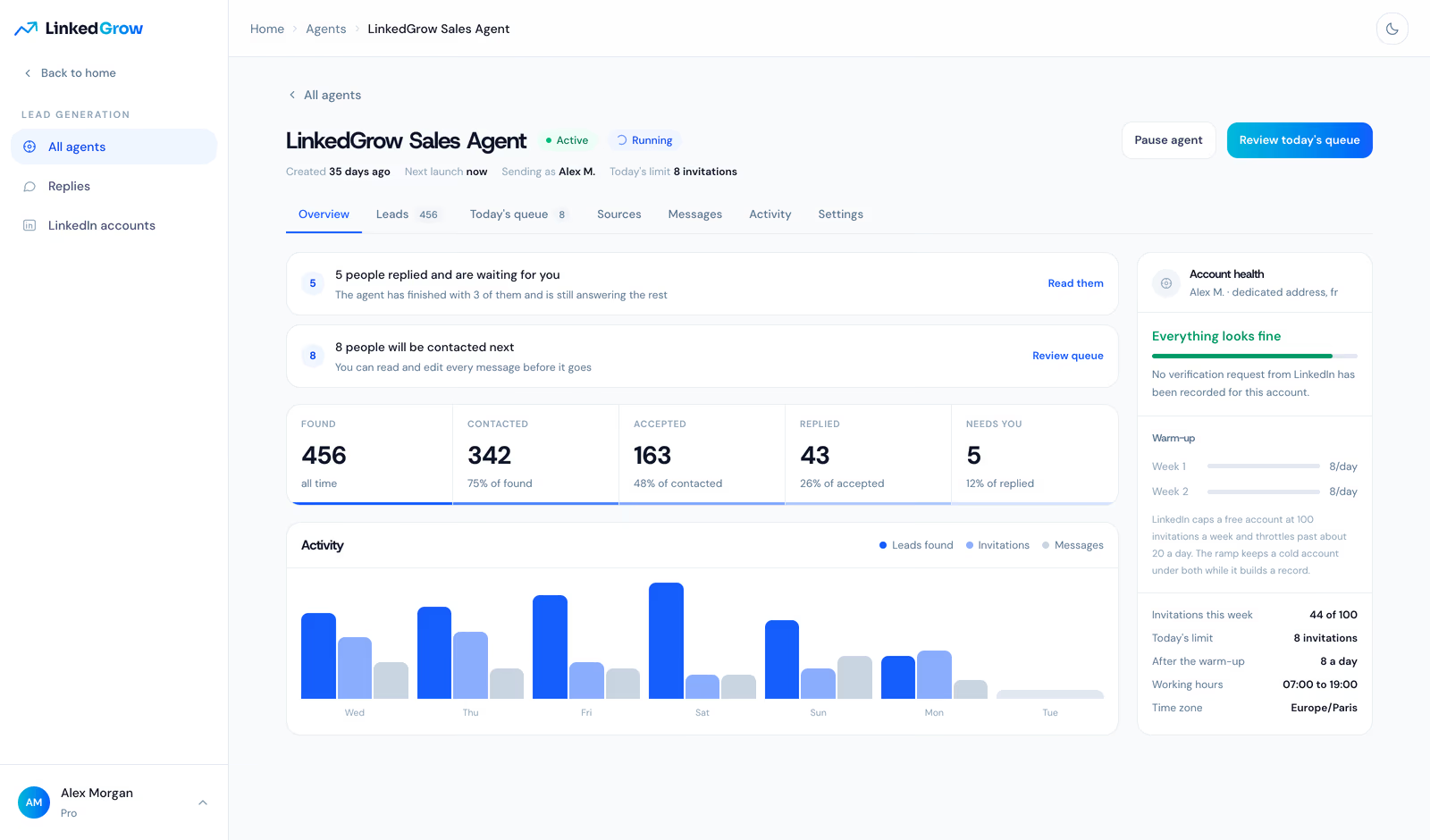
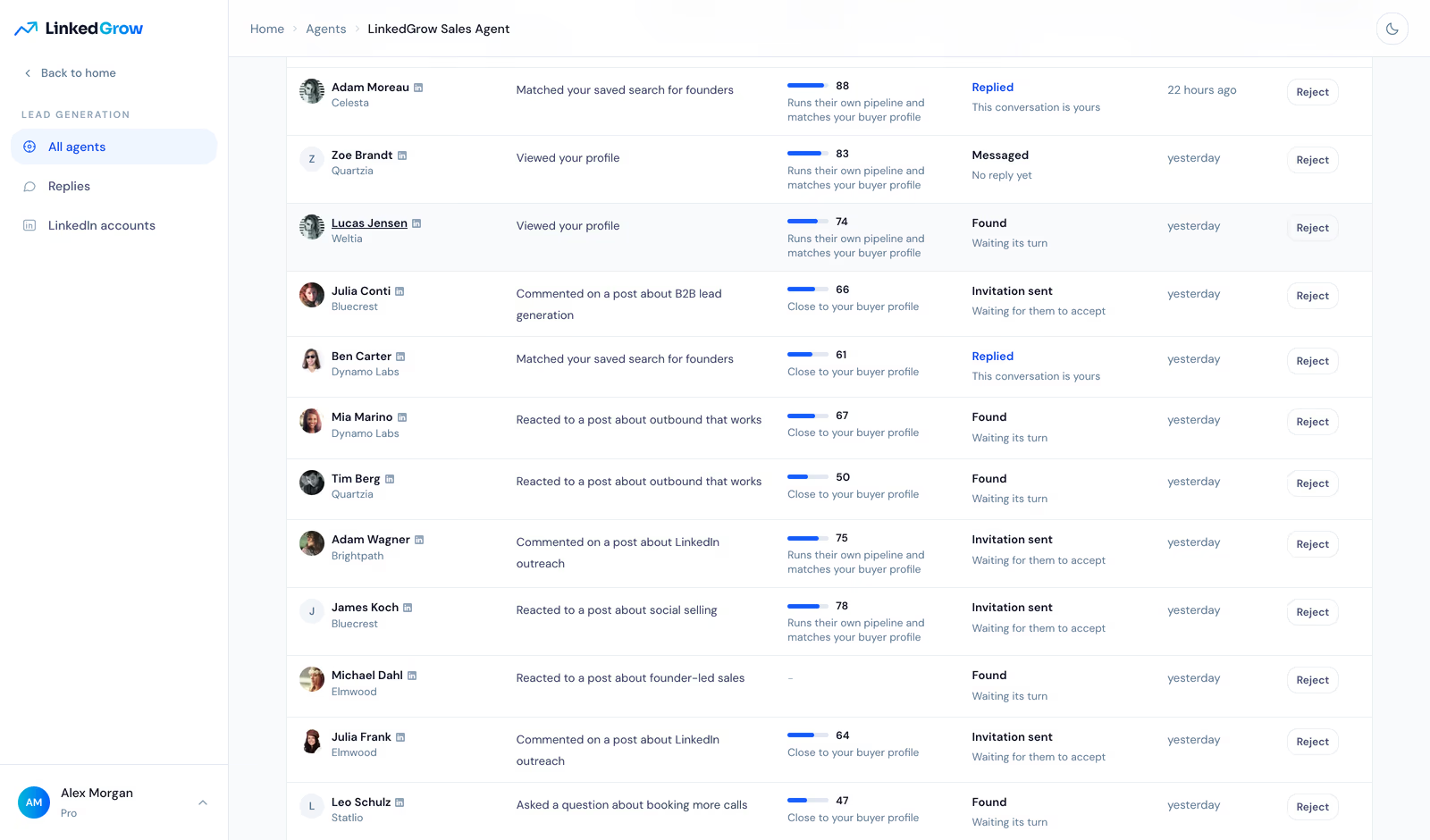
LinkedGrow v2 is a LinkedIn client acquisition platform for founders, freelancers, and small teams. You create an agent, point it at your website, and it builds a profile of your business on its own: what you sell, who buys it, and what those buyers talk about. From there it runs a daily loop. It finds people who match your buyer profile, scores each one, sends a short invitation from your account, and starts a conversation with the ones who accept. The dashboard above is what that loop looks like after a few weeks: how many people were found, contacted, and accepted, how many replied, and how many are waiting for you personally.
Two design choices matter more than any feature list. First, the agent works your real LinkedIn account, the way you would, at a human pace, inside limits you set. There is no browser extension and nothing to install. Each connected account gets a dedicated residential address in the country you pick and keeps it, because an account that shows up from a new city every week is what gets reviewed. Second, you stay in control of every word. The queue shows each planned message before it goes out, you can edit or remove any of them, and the whole agent pauses with one click.
The plans mirror how teams actually grow into this. Pro is $59/mo and runs 2 agents, which covers the common setup of one agent on buying signals and one on competitor audiences, both feeding the same account. Business is $89/mo with 3 agents, seats for your team, and the reporting that tells you which agent and which source the customers actually came from. Both plans are billed monthly and there is no annual commitment. The AI that runs the agents is included on both, which was the single most requested change from the v1 pricing model, where every AI feature depended on your own key.
It is for the people we built v1 for, one honest step further. A founder who has a product and no time for outbound. A freelancer or consultant whose pipeline still depends on referrals slowing down or not. An agency filling its own funnel between client work. The common thread is that your buyers are on LinkedIn and your calendar cannot absorb one more daily habit. The agent is that habit, held for you, every working day, whether or not you slept well.
A working day for the agent looks like a working day for a person. It visits its sources in the morning, scores what it found, sends the day's invitations at irregular moments across the hours you allow, answers the replies that came in, and files what needs your eyes under Replies. Nothing runs at night, nothing runs on the days you exclude, and the whole day fits inside the account's budget. You can watch it live from the Activity tab, or check the morning summary and move on with your own day.
How do the agents find your leads?
The starting point is your website, not a form. During setup the agent reads your pages and derives the targeting on its own: the problem you solve, the job titles that feel that problem, the company sizes that pay for it, and the words your buyers use when they complain about the status quo. You can override any of it, and most people adjust a line or two, but nobody starts from a blank persona worksheet. The difference shows in the first week of leads, because targeting derived from what you actually sell ages better than targeting typed from memory on day one.
From that profile, the agent hunts where buying intent already shows. It watches the sources you choose: people who engage with your competitors, people whose posts carry buying signals for your category, lookalikes of your existing customers, or a Sales Navigator list you already trust. Every candidate is scored against the buyer profile the agent built from your website, and every match arrives with a receipt: the post, comment, or reaction that surfaced this person, so you always know why the agent picked them before a single word is sent.
The volume side is deliberately boring: LinkedIn allows roughly 100 invitations a week, more on an established account, and the agent plans inside that budget rather than around it. A newly connected account ramps up over several weeks, the way a careful human would, and the daily number belongs to the account rather than to the agent, so two agents on one profile share one budget instead of quietly doubling it. If you want the wider picture of what a LinkedIn pipeline looks like beyond agents, our guide on how to generate leads on LinkedIn covers the manual playbook the agents are built on.
What happens when a lead replies?
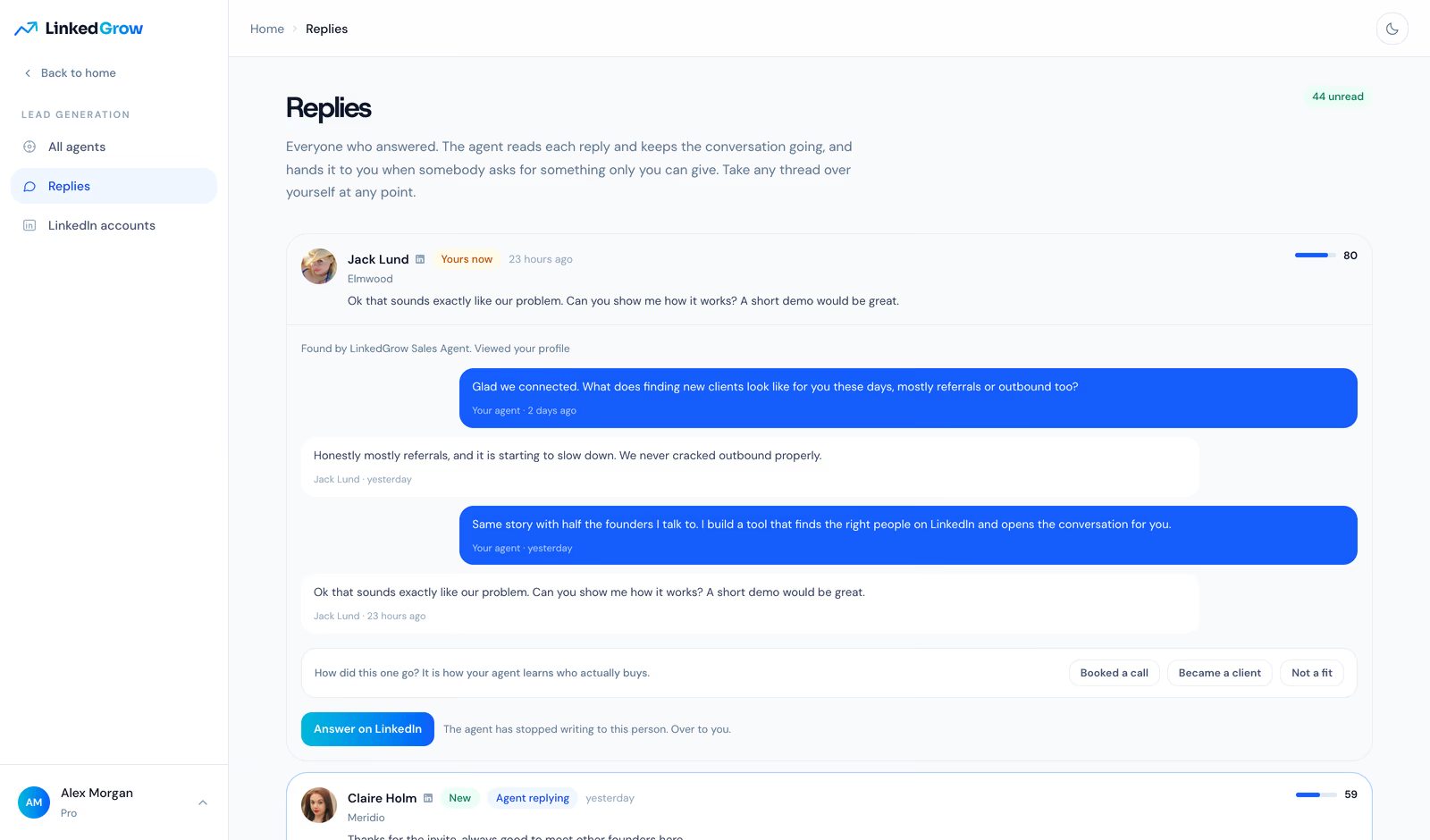
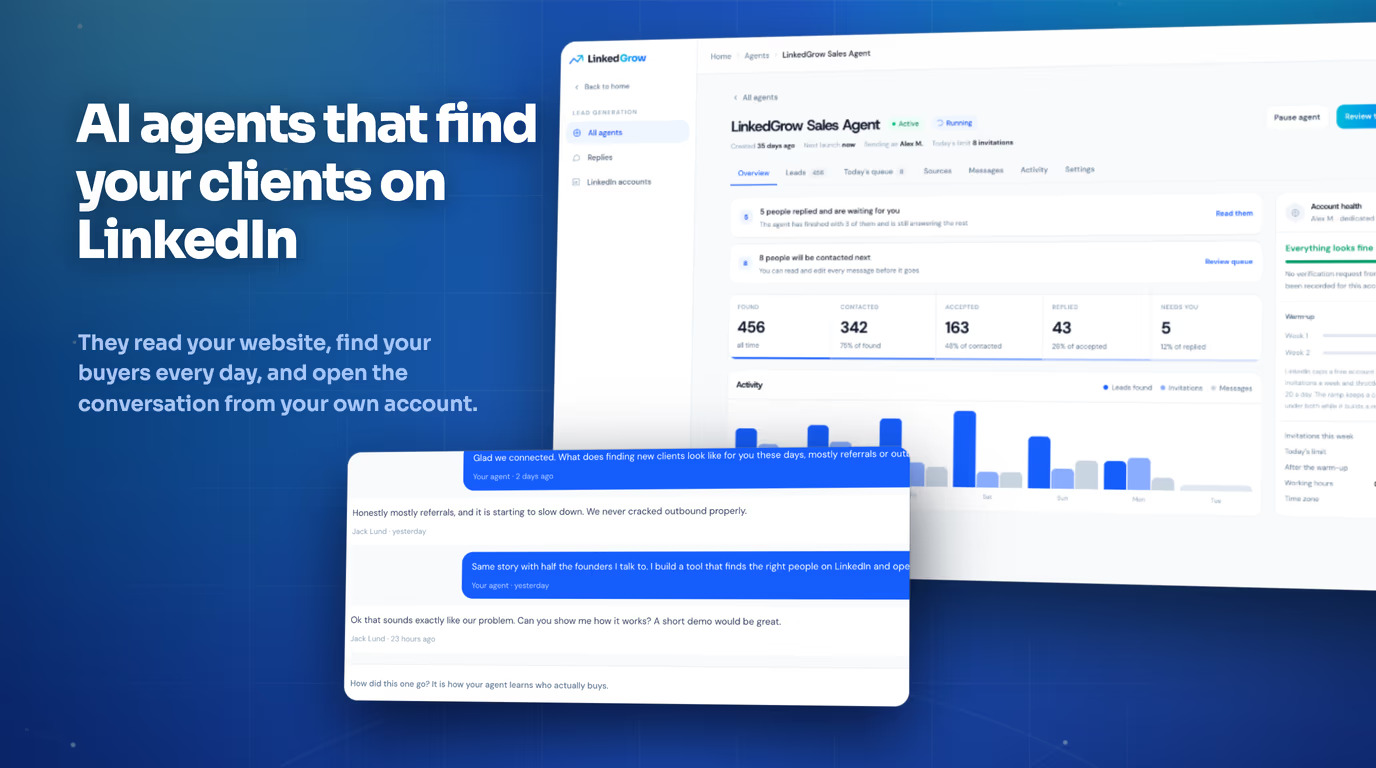
The agent reads each reply and keeps the conversation going on its own. It answers questions about what you do, asks about the lead's situation the way a person would, and gives before it asks. The moment somebody wants something only you can give, a demo, a price, a call, the agent stops writing and the thread appears in your Replies page marked as yours. You arrive when somebody is already talking to you, with the whole exchange above, instead of sorting through a list of cold names.
The screenshot above is the shape we optimized for. The agent opened with a question about how this founder finds clients today, shared something real about the product when the answer invited it, and the lead asked for a demo on the third message. That thread took the agent 2 days and took the founder 30 seconds of reading. You can also take any thread over yourself at any point, and the agent leaves it alone for good from that moment.
Just as important is what the agent refuses to do. It does not pitch people who said no, it does not chase somebody who stopped answering past the end of its short sequence, and it does not pretend to be interested in a post it never read. When a reply is a polite brush-off, the thread ends quietly and the person is left alone for good. Outreach only stays welcome on a platform when the sender knows when to stop, and teaching the agent to stop was more work than teaching it to write.
How does the agent get better over the weeks?
Every closed conversation feeds the next batch. When you mark a thread as a booked call, a new client, or not a fit, the agent treats that as the ground truth about who actually buys, which is a different population from who politely replies. Sources that produce customers get visited more, sources that produce chatty dead ends get visited less, and the buyer profile sharpens with every outcome you record. This is why the product asks you how a thread went in one click instead of burying that question in a form.
The three buttons under every closed thread do the recording: booked a call, became a client, not a fit. Pressing one takes a second and moves more than a week of automatic optimization does, because it is the only signal in the whole system that is not a proxy. A high match score is the agent's guess, an accepted invitation is mostly politeness, and a reply is interest at best. A customer is a customer, and once the agent knows which sources produce them, it spends your weekly invitation budget where the money was, instead of where the replies were friendliest.
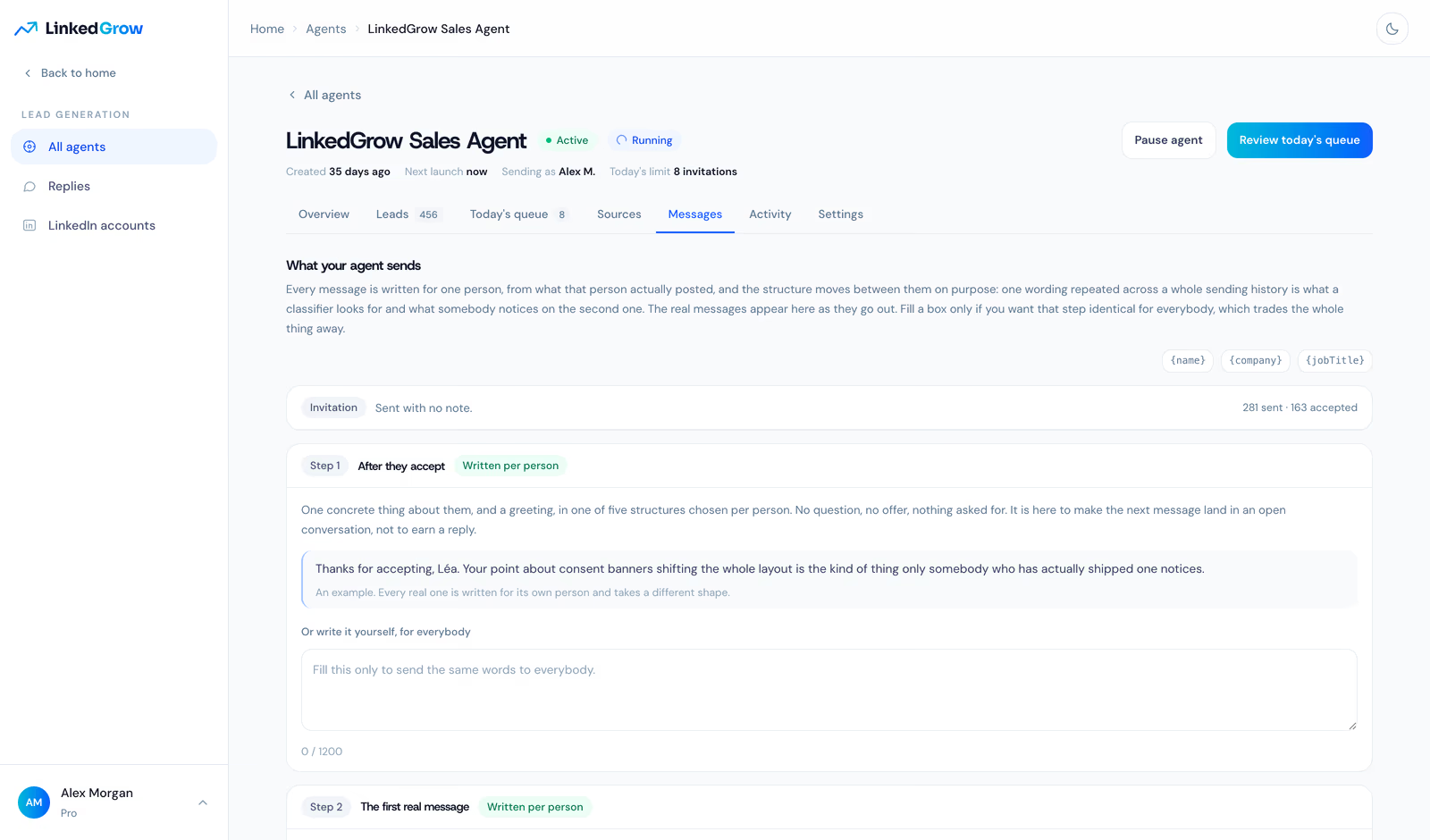
The writing improves the same way. The agent studies how you write, keeps its sentences short enough to read on a phone, and never recites somebody's own post back at them, because nothing reads more like a robot than a message that proves it watched you. Every draft passes a strict gate before it can be sent, and a draft that fails the gate is rewritten rather than softened. The result reads like a busy person typing, which is the entire point.
How do you set up an agent?
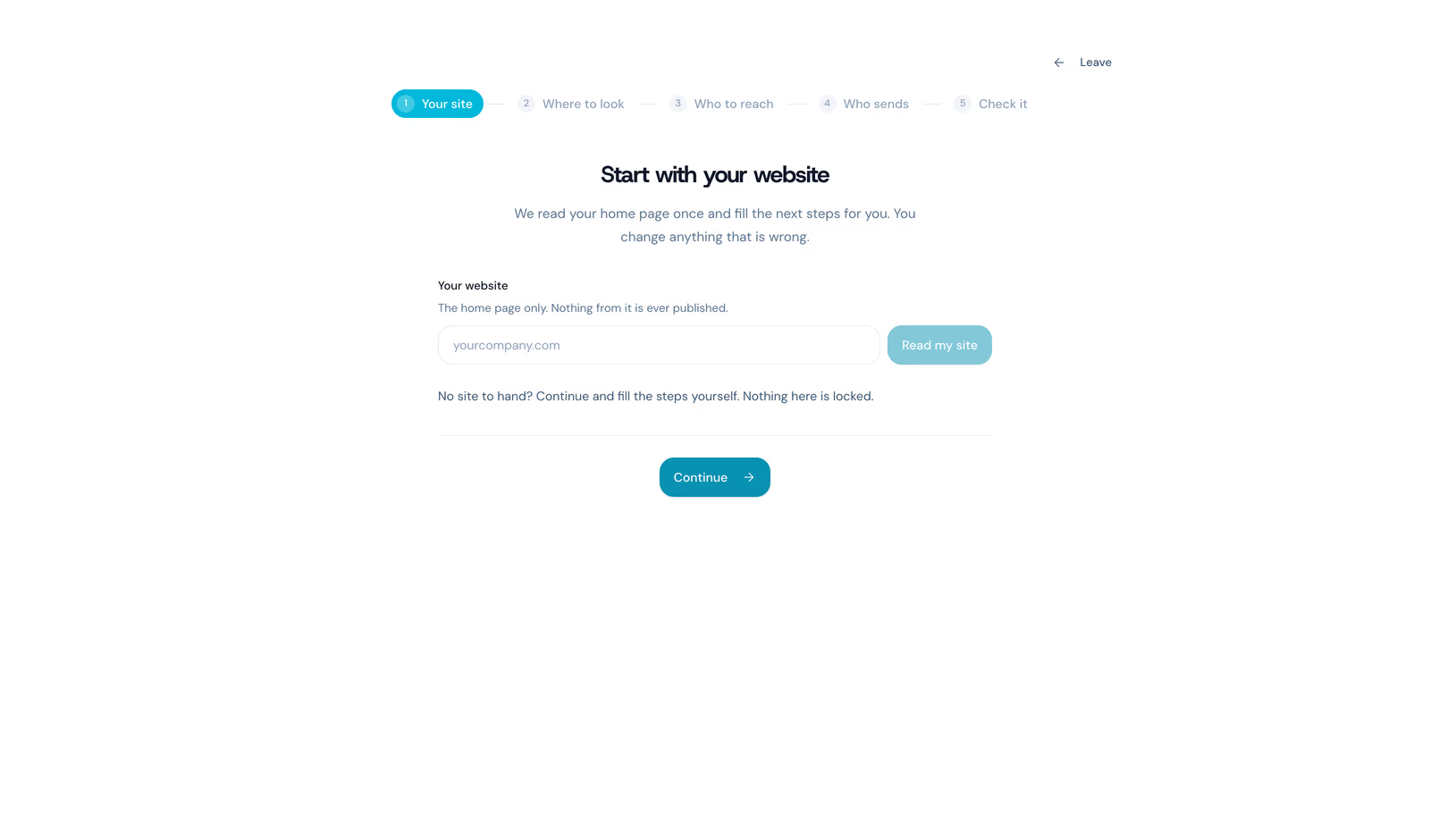
Setup takes a few minutes because the agent does the reading. You type your website address and the agent builds your business profile from your own pages. You tell it where to look, for example people who engage with a competitor you name. You tell it who to contact, with the job titles and company sizes that fit your buyers. You pick the tone your messages should carry. Then you review the summary, create the agent, and connect the LinkedIn account it will work from. It starts the same day, slowly at first, on purpose.
Set your expectations for week 1 accordingly. A warming account sends a handful of invitations a day, so the first days look quiet by design, and the leads list fills before the replies do. The rhythm you should expect is acceptance first, conversations second, handovers third, each about a week behind the previous one. By the time the funnel looks like the dashboard at the top of this article, the agent has been through enough conversations to know your buyers better than its own first guess did.
If you are comparing this approach with the outreach tools that came before it, the difference is the list. Classic tools sequence an audience you import and charge per user for the sending. LinkedGrow builds the list itself, every day, from your own website profile, and the price covers the workspace. Our Dripify comparison walks through that difference in detail, and the lead generation use case shows the full loop end to end.
What is still included from v1?
Everything that made v1 useful is still in the product. The post generator, hook writer, voice training, AI images, carousels, the content calendar, A/B testing, and analytics are all there, and they still run on your own AI key with 43 models across 6 providers to choose from. If you only ever use LinkedGrow to write and schedule, nothing about your routine breaks today.
What changed is that the two halves finally feed each other. The posts you publish warm up the same account your agent works from, which makes its invitations land better, because people accept a request from a profile with a pulse. And the people who engage with your posts are exactly the warm audience an agent should score first. In v1 those were two products pretending to be one. In v2 the content is the air cover and the agent is the ground game, and the leads carry the receipts showing which post did the work.
Is it safe for your LinkedIn account?
Safety questions deserve a straight answer rather than a badge, because on LinkedIn the answer is the architecture. The risk on LinkedIn comes from behaving like software: sending too much, too fast, too early, from addresses that keep changing. The agent is built to do the opposite on every one of those axes, and you can watch it do so from the account health panel on the dashboard.
A fresh account starts at a handful of invitations a day and earns its pace over several weeks of warm-up, the same way a careful human would ramp up. The weekly budget stays inside the roughly 100 invitations LinkedIn tolerates before its own invitation restrictions kick in, and it belongs to the account, not the agent, so adding a second agent never doubles your exposure. Actions land at irregular, human-looking moments inside the working hours you set, never in bursts. Each account keeps one dedicated residential address for its whole life with us. And because every planned message sits in a queue you can read before it goes, the agent never says anything you could not defend having typed yourself. If LinkedIn ever asks the account to verify, the agent stands aside and tells you instead of pushing through.
Why does LinkedGrow no longer use the LinkedIn API?
Version 1 connected to LinkedIn through the official API, and we ran into its walls for a year. The public API exposes two narrow products: signing in, and sharing a post, and that is the whole surface. It cannot read your replies, cannot send an invitation, cannot open a conversation, and cannot look at who engaged with anything, so the automations our users kept asking for were simply impossible to build on it. We shipped analytics screens that had to wait on access we could not get, and answered the same support question for months: why can the tool post for me but not talk for me? The honest answer was that the API said no.
There is also a quieter problem with building on an API you do not control. Scopes get reviewed, terms move, and a product built on somebody's interface can lose a feature overnight without anybody at the company doing anything wrong. Every roadmap decision starts with a question you cannot answer: will this access still exist next quarter? We spent a year planning around that uncertainty and decided we would rather build on the one thing that is actually yours: your own account, used the way you would use it.
Version 2 works the way you do: through your own account. The agent reads and writes as you, at a human pace, inside the same weekly limits every careful human respects, from one stable dedicated address. That is what makes the whole category of features possible, from invitations to conversations to the receipts on each lead. It also means publishing and scheduling posts now happen from your account at the exact minute you chose, instead of through an API token that expires every 60 days.
What do v1 users need to do?
One thing, and it takes a minute. Because the LinkedIn API is gone, the LinkedIn login button is gone with it, and your LinkedIn connection moved into the app. Go to Settings, then LinkedIn accounts, and enter your LinkedIn login there, so your agent can work from your account, and that is the whole migration. Your posts, drafts, voice training, and everything else you built in v1 are exactly where you left them.
If you hold a v1 lifetime deal, two things are true at once. Everything you bought stays yours forever: the content tools keep working with no plan and no card, exactly as promised. The agents are a different kind of product, because they spend real money every day they run, on the dedicated address, the browser doing the work, and the agent AI that reads and writes on our side. A lifetime license cannot honestly cover a cost that never stops. So instead of pretending it can, lifetime holders keep half off the old Pro price for as long as they keep the plan. That is $49.50 a month, applied automatically at checkout from your account, with no code to type and nothing to claim. Business is $89 a month, the same as everybody else pays, and the $39 extra agent stays full price.
The content side of LinkedGrow did not go anywhere. Post generation, voice training, images, carousels, and the calendar all still run on your own AI key, with 43 models across 6 providers to choose from, at the $2 to $4 a month those providers actually charge. What changed is what surrounds the content: the posts you publish now feed the same account your agent works, and the people who engage with them become candidates the agent can score. Writing and prospecting stopped being two separate jobs.
LinkedGrow v2 is live today at $59/mo for Pro with 2 agents and $89/mo for Business with 3 agents and team features, both billed monthly with no annual commitment. Every new account starts with a 7-day trial of the full product, agents included, and cancelling takes one click from the dashboard. Point an agent at your website this week and read what comes back. The first reply from a person your agent found on its own is a strange and excellent feeling.
LinkedGrow v2 is a LinkedIn platform built around AI agents that find your clients for you. An agent reads your website, works out who buys from you, finds those people on LinkedIn every working day, and opens the conversation from your own account. The content tools from v1 are still included.
Yes: each agent works your real LinkedIn account at a human pace, inside sending limits you control, and every connected account keeps its own dedicated residential address. You can read and edit every message in the queue before it goes out, and you can pause the agent at any time.
Pro is $59/mo with 2 agents and Business is $89/mo with 3 agents plus team features, both billed monthly with no annual commitment. The agent AI is included in the price. Every account starts with a 7-day trial of the full product, cancellable in one click.
No: the AI that runs the agents is included in your plan, so finding and messaging leads costs nothing extra. Your own key is only used when you generate posts and images with the content tools, which typically costs $2 to $4 a month paid directly to your AI provider.
Your account, your posts, and your settings are all still there. One thing changed: since the LinkedIn login button is gone, your LinkedIn connection now lives in Settings, under LinkedIn accounts. Enter your LinkedIn login there once, and your agent works from that account from then on.
The people you just read about are already on LinkedIn.
LinkedGrow runs an agent that finds the ones who match the customers you already have, sends the invitation in your words, and opens the conversation. You pick it up when somebody answers.
Build my agent free