

Learning how to use AI to write LinkedIn posts without sounding robotic has become the essential skill of 2026. You can spot the failures from a mile away - posts that start with "In today's rapidly evolving landscape" and end with "What are your thoughts? Let me know in the comments below!" Everything in between reads like a press release written by committee - technically correct, structurally sound, and completely devoid of personality. These are AI-generated posts that nobody bothered to edit, and they are flooding LinkedIn at an alarming rate.
An Originality.ai study found that over half of all long-form LinkedIn posts are now likely AI-generated. That same research found something else worth paying attention to: AI posts receive roughly 45 percent less engagement than human-written content. Think about that for a second. More than half of LinkedIn's long-form content is AI-generated, and that content dramatically underperforms. People can feel the difference, even if they can't always explain what's off.
But here's the thing most people get wrong: the problem is not AI itself. A separate Buffer study analyzing 1.2 million posts found that AI-assisted content on LinkedIn actually gets about 10 percent higher engagement than content written without any AI help. The gap between those two findings is everything. Raw AI output tanks your engagement. AI-assisted content, where a human guides the process and adds their voice, actually outperforms purely human-written posts.
The trick is learning how to use AI as a writing partner rather than a replacement. With the right approach - including voice training, smart editing habits, and thoughtful model selection - you can publish LinkedIn posts that are AI-assisted but sound completely, unmistakably you. This guide shows you exactly how to do that with LinkedGrow.
Why do most AI LinkedIn posts sound terrible?

Before you can fix the problem, you need to understand what makes AI content so recognizable. When you paste "write me a LinkedIn post about leadership" into ChatGPT or Claude and hit enter, the output has a very specific flavor. It is polished, balanced, and generically motivational. It reads like it could have been written by anyone, because it was written by no one. That absence of a real person behind the words is exactly what people pick up on.
There are concrete patterns that give AI writing away. Vocabulary is the biggest tell. AI models have favorite words that they reach for far more often than any human would. "Delve," "navigate," "unlock," "elevate," "foster," "landscape," "realm," "beacon," "tapestry." A Max Planck Institute study found that usage of words like "delve" has spiked over 50 percent in published content since ChatGPT launched. If your LinkedIn post uses three of these words in five paragraphs, your audience will notice.
Structure is the second giveaway. AI loves parallel construction. It will give you three bullet points where each starts with a gerund. It will balance every paragraph at roughly the same length. It will end with a motivational question that sounds sincere but feels hollow. Real humans are messier. They write one paragraph that is two sentences long and another that goes on for eight. They start sentences with "And" and "But." They have quirks, and those quirks are what make writing feel alive.
Then there is the specificity problem. AI content stays abstract because it has no real experiences to draw from. It will tell you that "building meaningful connections is essential for professional growth." A human will tell you about the cold email they sent to a stranger in 2019 that led to a partnership worth six figures. Specificity is the single biggest differentiator between content that feels human and content that feels generated. The more concrete details, names, numbers, and stories you include, the harder it becomes for anyone to suspect AI was involved.
The last pattern is emotional flatness. AI can write about struggle and triumph, but it does so in a way that feels performative rather than vulnerable. Real personal stories include moments of doubt, embarrassment, or confusion that the writer clearly wrestled with. AI tends to smooth those edges, turning every experience into a neat lesson with a tidy takeaway. That sanitized version of reality is what makes AI posts feel like corporate communications instead of human conversation.
How does LinkedIn's algorithm handle AI content?

This is not just about fooling your human readers. LinkedIn itself is paying attention. The 2026 LinkedIn algorithm evaluates what it calls "creator authenticity signals" as one of its core ranking factors. According to SourceGeek's analysis of the 2026 update, LinkedIn explicitly flags "overly AI-sounding phrasing" as a spam signal that can suppress your post's distribution.
What does that actually mean in practice? It means that content that looks engineered rather than written for humans gets downranked. If your post follows a templated structure, uses generic motivational language, and lacks any personal context, the algorithm is less likely to push it to a wider audience. LinkedIn has been increasingly transparent about prioritizing content from real people sharing genuine experiences over polished marketing copy that could have come from anyone.
The algorithm looks at several signals to gauge authenticity. Engagement depth matters more than engagement volume. A post that gets 50 thoughtful comments from real connections outperforms one that gets 200 emoji reactions from strangers. AI-generated content tends to attract shallow engagement because it does not provoke genuine reactions. People might drop a like out of politeness, but they rarely feel compelled to share a detailed response to something that reads like it was written by a template.
Dwell time is another critical factor. When someone stops scrolling, reads your entire post, and then goes back to read it again, that sends a powerful signal to the algorithm. AI content rarely achieves this because it lacks the unexpected insights, personal stories, and genuine perspectives that make people pause. When every sentence is predictable, there is no reason to slow down and absorb it. We covered this in detail in our LinkedIn algorithm deep dive.
The good news is that the algorithm does not care whether you used AI in your writing process. It cares about the final result. A post that was drafted with AI assistance but edited to include your real voice, personal details, and authentic perspective will be treated the same as a fully human-written post. The algorithm rewards the output, not the process. That is exactly why the editing and personalization steps we are about to cover matter so much.
How does voice training change AI-generated content?

The single biggest leap you can make in AI-assisted writing quality is training the AI to understand your voice before it writes a single word. Think about it this way: when you ask a generic AI to write a LinkedIn post, it pulls from its training data, which represents millions of writers. The output is essentially an average of everyone. It is competent but characterless. Voice training narrows the AI's focus to sound like one specific person: you.
LinkedGrow's voice training system works by analyzing your sample posts to identify your unique writing patterns. Not just the obvious things like vocabulary and sentence length, but the subtler elements too. Do you tend to open with questions or statements? Do you use data heavily or lean on stories? Do you write in first person or address the reader directly? How formal or casual is your tone? All of these signals get captured and fed into the AI's context so it can generate content that actually sounds like you wrote it on a good day.
The setup is straightforward. You provide 5 to 10 of your best LinkedIn posts as samples. These should be posts where you felt most like yourself, not necessarily your most popular ones, though there is often overlap. Then you add context: a brief business description so the AI understands your professional world, your target audience so it knows who you are writing for, your preferred writing tone, and a list of words or topics you never want mentioned. That "never mention" feature is surprisingly useful. If you are a SaaS founder who never wants to sound like a motivational speaker, you can explicitly ban phrases like "unlock your potential" from your generated content.
The difference between a voice-trained AI and a generic one is night and day. Without training, you might get: "In the ever-evolving world of digital marketing, it is crucial to stay ahead of the curve. Here are five strategies to elevate your approach." With proper voice training, the same request produces something that actually sounds like a specific person sharing a real opinion. The AI picks up your rhythm, your level of directness, your tendency to use short punchy sentences or longer flowing ones. It is still AI, but it is AI that has been pointed in your direction.
Voice training also solves one of the biggest frustrations with AI content: the endless editing cycle. When you start with output that already sounds 70 percent like you instead of 20 percent, the editing process goes from a painful rewrite to a quick polish. You are fixing small things - swapping a word here, adding a personal detail there - instead of tearing the whole thing apart and rebuilding from scratch. For solopreneurs and busy professionals who need AI to actually save time, voice training is the non-negotiable first step.
What editing workflow makes AI sound like you?
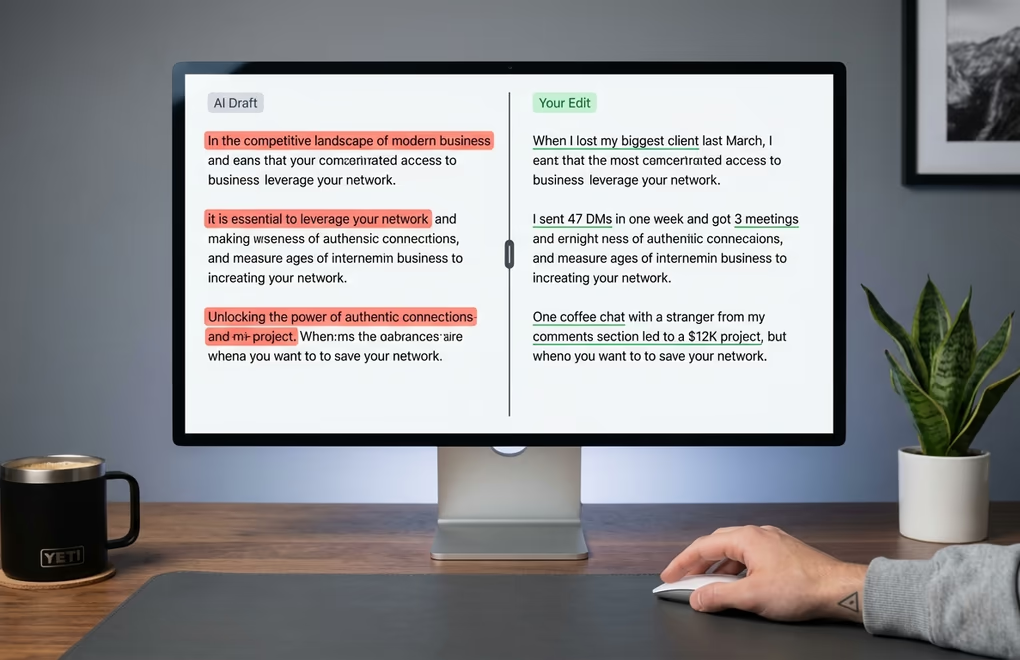
Even with voice training, you should never publish AI output without editing it. Run the final draft through the free LinkedIn character counter to make sure the "see more" cutoff lands on the right line, then use the LinkedIn text formatter to bold the punchy lines that anchor the post. I know that defeats part of the appeal. You wanted to type a topic, click generate, and be done. But the 10 to 15 minutes you spend editing are what separate your content from the sea of generic AI posts that LinkedIn users are learning to scroll past. Think of the AI as a very fast first-draft writer who knows your style but has never lived your life. Your job is to inject the life.
The first pass is the specificity check. Read through the draft and find every sentence that could apply to anyone. "I learned the hard way that consistency matters." That sentence tells the reader nothing. Replace it with something only you could say. "I posted on LinkedIn every Tuesday for three months and my impressions tripled from 800 to 2,400 per post." Notice how the second version includes a timeline, specific numbers, and a concrete outcome. Nobody else has that exact experience. That specificity is your fingerprint, and it is impossible for any reader or algorithm to flag as AI-generated.
The second pass is the vocabulary sweep. Scan for words you would never use in real conversation. Would you actually say "delve" to a colleague over coffee? Would you describe your industry as a "landscape"? Would you tell someone to "unlock their potential"? If the answer is no, replace those words with whatever you would actually say. This single step eliminates the most obvious AI tells and it takes about two minutes.
The third pass is the hook check. AI-generated openings tend to be safe and explanatory. They set up the context before getting to the interesting part. But on LinkedIn, you have about 1.5 seconds before the reader decides to keep scrolling. Check your first line and ask: would I stop scrolling for this? If not, rewrite it. A strong LinkedIn hook is often the most important thing to write yourself, because it needs to feel genuinely surprising, vulnerable, or provocative in a way that AI rarely nails on its own.
The final pass is reading the entire post out loud. This sounds old-fashioned, but it works better than any other editing technique I have tried. AI-generated text often has a rhythm that looks fine on screen but sounds strange when spoken. If you stumble over a sentence or it feels unnatural coming out of your mouth, rewrite it. Your ear catches things your eyes miss. After a few weeks of this workflow, you will develop an instinct for which parts of an AI draft need attention and which are already solid. The whole process gets faster with practice, and eventually you will spend more time on the specificity check than everything else combined.
Which AI model best matches your writing style?
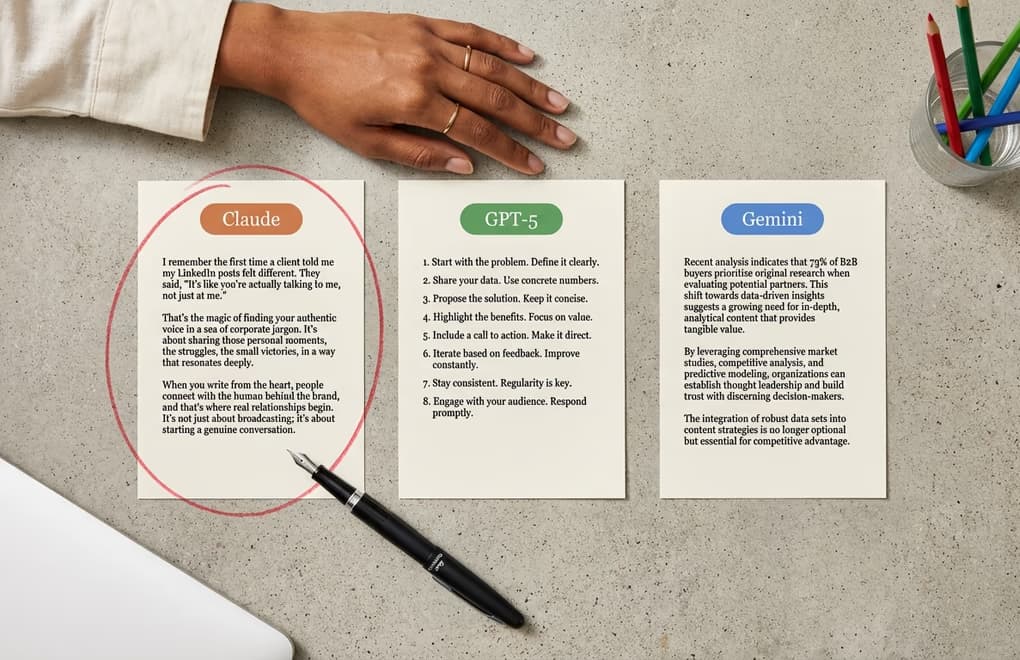
Here is something almost nobody talks about when it comes to AI LinkedIn content: the model you choose shapes the voice you get. ChatGPT does not write like Claude, which does not write like Gemini. Each model has its own tendencies, strengths, and quirks. Picking the right one for your natural writing style can cut your editing time in half because the raw output already leans in the direction you want to go.
Claude tends to produce more conversational, flowing prose. It handles nuance well and is less likely to reach for corporate jargon. If your writing style is more essayistic - if you prefer longer thoughts and a reflective tone - Claude is often the best starting point. ChatGPT excels at structured content. It gives you clean organization, strong transitions, and punchy sentences. If you write in a more direct, business-focused style, ChatGPT's output will feel closer to your voice right out of the box. Gemini has a research-oriented flavor that works well for data-heavy posts where you want to weave in trends and studies naturally without sounding like a textbook.
This is where the BYOK (Bring Your Own Key) approach becomes a real advantage. Most LinkedIn AI tools lock you into whatever model they have chosen behind the scenes. You get their AI, their style limitations, their quality ceiling. With LinkedGrow, you connect your own API keys and pick from over a dozen models across OpenAI, Anthropic, Google, Grok (xAI), Perplexity, and Kimi. If Claude produces output that matches your voice better than ChatGPT, you use Claude. If you find that Gemini handles your industry topics more naturally, switch to Gemini. You are never stuck with someone else's choice.
The cost angle is worth mentioning too. With BYOK, you pay the AI provider directly for what you actually use, which typically comes out to two to four dollars per month for regular LinkedIn posting. That is a fraction of what tools like Taplio or Supergrow charge for their built-in AI, which costs the same whether you generate three posts or thirty. You get better model flexibility and lower costs at the same time, which is a combination that does not come along often.
My recommendation: try two or three models with the same prompt and compare the outputs side by side. Generate a post about a topic you know well, one where you can immediately tell whether the AI captured your voice or missed it entirely. You will usually find that one model clicks better with how you naturally communicate. Once you identify your preferred model, pair it with voice training in LinkedGrow's AI post generator, and the baseline quality of your drafts will improve noticeably.
Prompting Techniques for Authentic LinkedIn Content

Voice training and model selection set the foundation. How you prompt takes it the rest of the way. Most people prompt AI the way they would search Google: short, vague, and hoping for the best. "Write a LinkedIn post about hiring." And then they are surprised when the output sounds generic. The AI gave exactly what was asked for - a generic post about a broad topic with zero human context to draw from.
The single most effective prompting technique is feeding the AI a specific personal experience and asking it to build a post around that story. Instead of "write about hiring," try something like: "Write a LinkedIn post about the time I hired our fifth employee. We had 200 applicants. The person I almost did not interview ended up being our best hire because they had no industry experience but incredible problem-solving skills. The lesson is about looking beyond resumes." That prompt gives the AI real material to work with. The output will include your story, your numbers, and your takeaway. It sounds human because it started from a human experience.
Another technique that works well is the contrarian take. The LinkedIn algorithm rewards posts that spark genuine debate, and nothing sparks debate like a well-reasoned opinion that goes against conventional wisdom. You can prompt the AI with your contrarian view and ask it to build a persuasive case. "I believe that posting daily on LinkedIn actually hurts most people. Write a post arguing this position, using the logic that quality matters more than frequency and that most daily posters sacrifice depth for consistency." The AI will structure the argument, and you edit for your voice. The opinion is genuinely yours, which is the part that matters.
The "avoid" instructions are just as important as the "do" instructions. Tell the AI what not to do. "Do not use the word delve. Do not start with In today's or end with What do you think? Do not use bullet points. Do not include more than one statistic. Keep sentences under 25 words on average." These constraints force the AI out of its default patterns and toward something more original. Every constraint you add pushes the output further from the generic center and closer to sounding like an actual person with opinions.
One more technique worth adopting: the two-step generation. Use the AI to brainstorm ten possible angles on a topic, pick the most interesting one, and then prompt a full draft from that specific angle. This prevents the AI from defaulting to the most obvious, overused take on any subject. LinkedGrow's AI post generator can help with that initial brainstorming step, letting you generate multiple angles quickly and then refine the best one into a full draft. The best LinkedIn content starts from a genuinely interesting perspective, and sometimes the AI is better at generating ten perspectives for you to choose from than it is at executing perfectly on the first try.
Make AI Your Writing Partner, Not Your Replacement
The future of LinkedIn content is not pure AI or pure human. It is the combination. The creators who will thrive in 2026 and beyond are the ones who learn to use AI for speed and structure while bringing their own experiences, opinions, and voice to every post. Train the AI on your voice. Pick the model that writes most like you think. Prompt with specifics rather than generalities. And always, always edit before you publish.
LinkedGrow is built for exactly this workflow. The voice training learns your style from your best posts. The AI post generator gives you a strong first draft in seconds. The BYOK model lets you pick the AI that matches your voice best, whether that is Claude, ChatGPT, Gemini, or something else entirely. And because you bring your own API key, the whole thing costs a few dollars a month instead of the $40 to $80 you would pay for tools that lock you into their AI. Try it free and see what happens when AI actually sounds like you.
Frequently Asked Questions
LinkedIn does not explicitly label posts as AI-generated, but its algorithm evaluates authenticity signals and can suppress overly generic content. The key is making your AI-assisted posts personal and specific enough to pass both algorithmic and human scrutiny. Well-edited AI content is treated the same as fully human-written posts.
There is no single best model for everyone. Claude tends to produce more natural, conversational prose. ChatGPT is strong for structured business content. Gemini works well for research-heavy posts. Try two or three models with the same prompt and see which output most closely matches your personal writing style.
Most voice training systems work well with 5 to 10 sample posts that represent your best writing. Choose posts that got strong engagement and sound most like you. The samples should cover different topics but maintain your consistent style. Quality matters more than quantity when training AI on your voice.
Using AI as a writing assistant is widely accepted in professional content creation. The ethical line is presenting purely AI-generated content as your own original thought without any human input. Best practice is using AI for drafting and ideation while adding your own experiences, opinions, and personality during editing.
A well-prompted AI draft typically needs 10 to 20 minutes of editing to sound authentically yours. That includes replacing generic examples with personal stories, adjusting tone, and cutting AI-sounding phrases. With voice training and practice, editing time drops to 5 to 10 minutes per post.
The post you keep meaning to write takes four minutes here.
LinkedGrow turns a link, a video or a rough idea into a LinkedIn post written in your own voice, then puts it in the calendar for the morning your audience is awake.
Start free for 7 days