Most people who subscribe to LinkedIn AI tools do not realize they are paying a significant markup on AI generation that costs the provider a fraction of what they charge. Understanding how much AI content creation costs compared to SaaS subscriptions reveals a structural gap between what these tools pay for AI access and what they charge you for it - a gap that the BYOK model was designed to close. This article breaks down exactly what the math looks like in 2026, with verified pricing for both SaaS tools and direct API access, so you can make an informed decision about what you are actually paying for.
The short version: for a typical LinkedIn creator posting three to five times per week, direct API costs run between $0.50 and $3.50 per month depending on the model. Most LinkedIn AI tools with bundled AI generation charge between $39 and $65 per month for plans that include this capability. The difference between those numbers is not because the SaaS tools are doing something dramatically more complex with the AI - it is because they are buying API access at wholesale and selling it at retail, with their margin built into your monthly subscription whether you use it or not. LinkedGrow's AI cost calculator lets you model this precisely for your own usage patterns.
What is the hidden markup inside LinkedIn AI tools?
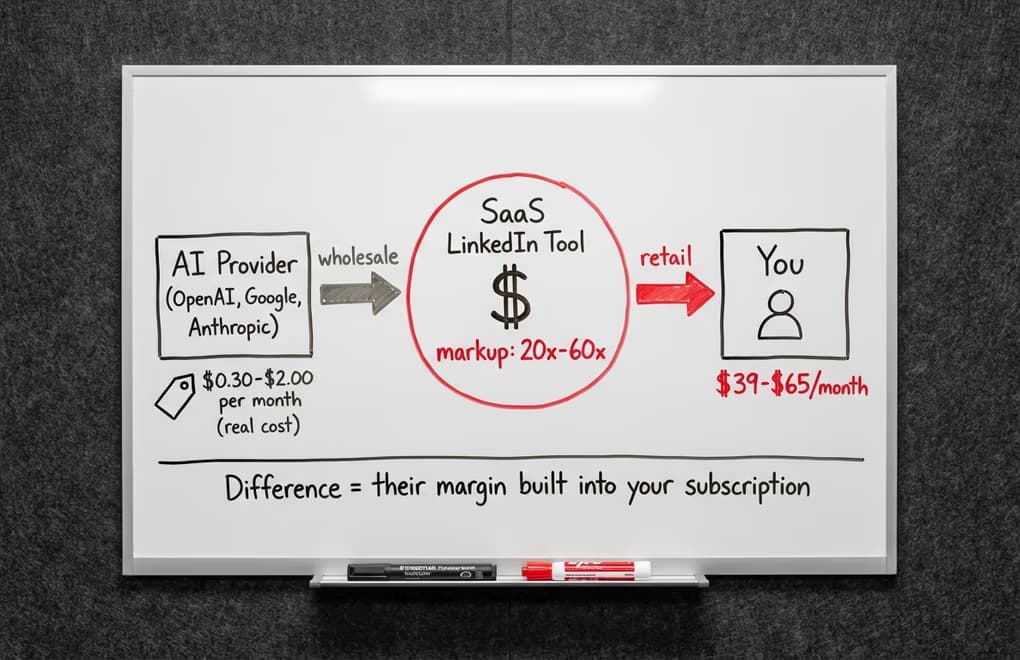
Every SaaS tool that offers AI-powered content generation is, at its core, reselling access to AI models built and maintained by OpenAI, Anthropic, Google, or another foundation model provider. The tool pays those providers based on the number of tokens processed - a measure of text volume - at rates published publicly on each provider's pricing page. They then build a product layer on top of that API access and charge you a monthly subscription that includes, among other things, their cost of AI generation plus a margin.
This model is not inherently unfair - building a useful product takes real engineering effort, and companies need to cover costs beyond raw API fees. The problem is when the AI generation component is priced as if it were a scarce resource, when in reality it is a commodity available to anyone with a credit card and five minutes. When a LinkedIn tool charges $65 per month for a plan that includes AI writing and the underlying AI cost for a typical user is $1 to $3 per month, the markup is in the range of 20x to 60x on that specific component. You are not just paying for the AI - you are paying for the marketing, the sales team, and the business model that made it seem like you needed to buy AI through them.
There is also a usage-independent cost structure baked into most SaaS AI tools that punishes light users and rewards heavy ones. If you pay $65 per month for 500 AI generation credits and you use 50 of them, you paid $1.30 per generation. If you use all 500, you paid $0.13 per generation. The person who posts three times per week effectively subsidizes the person who posts twenty times per week, even though both pay the same subscription. With direct API access, you pay exactly for what you use - nothing more, nothing less, which means occasional creators pay almost nothing and heavy creators still pay far less than a flat monthly subscription.
How does BYOK change the economics of AI content creation?
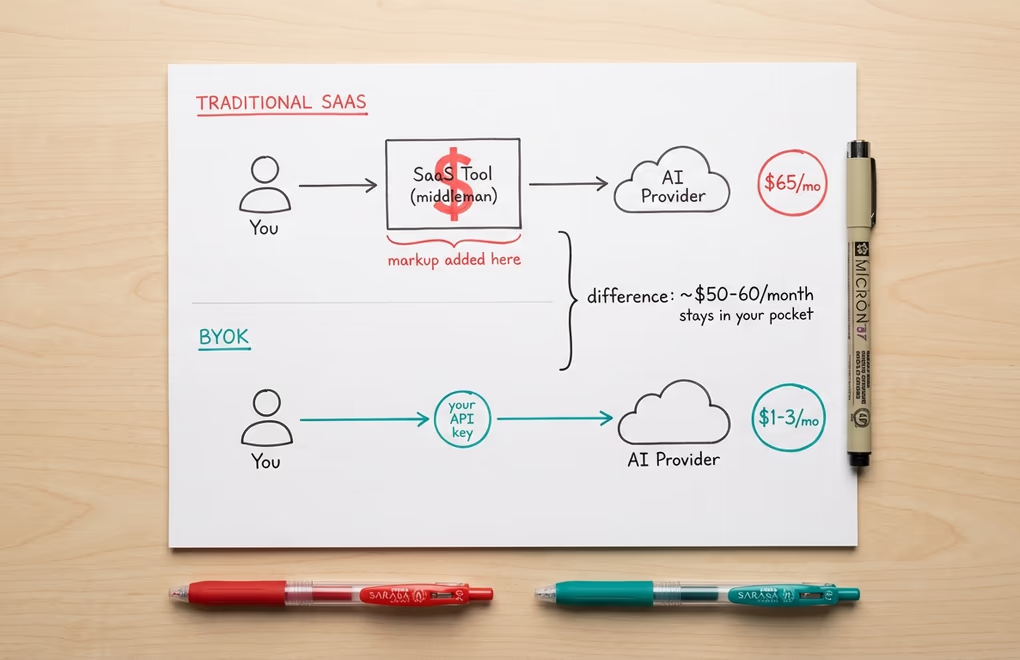
The BYOK model inverts this structure entirely. Instead of buying AI generation through LinkedGrow's subscription, you connect your own API key from whichever AI provider you choose - OpenAI, Anthropic, Google, Grok, Perplexity, or Kimi. When you generate a post through LinkedGrow, the request goes directly from the platform to your chosen provider using your key, and you are billed directly by that provider at their published rates. LinkedGrow takes nothing from that transaction. The platform subscription covers everything else - the post editor, scheduling, analytics, the voice training system, the content calendar, and all the workflow tools - but the AI generation cost is a direct relationship between you and the model provider with no middleman.
The practical setup takes about three minutes per provider. You create an account on the provider's platform, navigate to their API section, generate a key, add a small credit balance (usually $5 to $10 to start), and paste the key into LinkedGrow's BYOK settings. From that point forward, every AI generation in LinkedGrow uses your key and charges your provider account directly. You can monitor exactly how much you spend on each provider's dashboard, set spending limits if you want guardrails, and change models or providers at any time without changing your LinkedGrow plan.
The model selection flexibility that comes with BYOK is an underappreciated advantage beyond the cost savings. When a SaaS tool bundles AI generation, they typically use one or two models that work well for their infrastructure and margin requirements, not necessarily the models that would work best for your specific content style. With BYOK, you can run Claude Sonnet 4.5 when you want nuanced, thoughtful drafts, switch to Gemini 2.5 Flash when you need fast iteration through many ideas, and use GPT-4o for posts where instruction-following precision matters most - all within the same interface, switching with a single setting change.
What do you actually pay for AI LinkedIn content?
To make this concrete rather than theoretical, here is what the numbers actually look like for a typical LinkedIn creator who posts three to four times per week and occasionally generates extra drafts, hooks, or ideas. That usage pattern generates roughly 60 to 80 thousand tokens per month across all AI interactions - a figure that sounds large until you understand that a single well-written LinkedIn post is about 300 words or roughly 400 tokens.
On that usage, Gemini 2.5 Flash costs approximately $0.10 to $0.30 per month at Google's published rates - genuinely negligible. GPT-4o, which is more expensive but offers stronger instruction-following for complex prompts, costs around $0.40 to $0.80 per month for the same usage. Claude Sonnet 4.5 sits in the middle at $0.50 to $1.20 per month and produces noticeably stronger prose for professional content. Even the heaviest users - those generating 200 or more posts per month across multiple client accounts - rarely exceed $5 to $8 per month with any of these models.
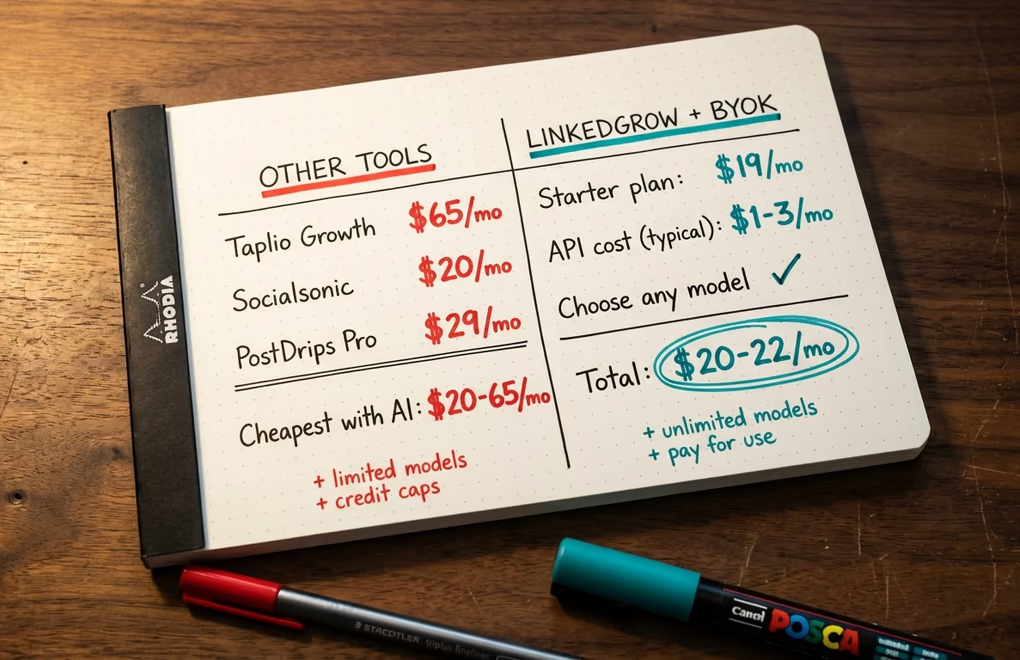
Compare that against the alternatives. Taplio's Growth plan, which includes AI writing features, is $65 per month billed monthly or $49 per month billed annually. That is a plan where the AI generation component costs the provider a dollar or two per typical user per month. LinkedGrow's equivalent plan is $39 per month including all Pro features - and the AI cost on top of that is $0.50 to $1.50 per month with your own key, making the total somewhere between $39.50 and $40.50 per month for the same generation capability with more model choices. For the Starter plan at $19 per month, the total with BYOK is $19 to $21 per month versus $49 to $65 for comparable tools - a difference that adds up to several hundred dollars per year.
How do you use the AI Cost Calculator to find your number?
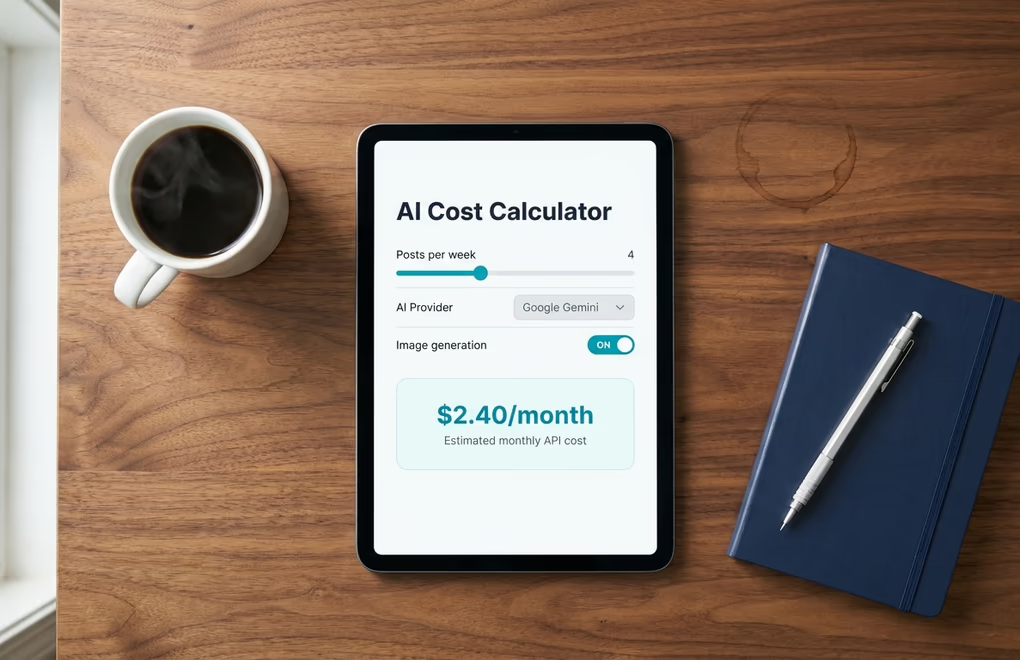
The numbers above are representative for a typical creator, but your actual costs depend on how many posts you generate, which model you prefer, how often you iterate on drafts, and whether you use additional features like hook generation, image generation, or the ideas generator. LinkedGrow's free AI cost calculator lets you input your own usage parameters and see the projected monthly cost across different providers and models side by side, so the comparison is based on your actual usage rather than a theoretical average.
The calculator is particularly useful for agencies and teams managing content for multiple clients, where per-client costs need to stay predictable and justifiable. Because BYOK usage scales linearly with actual generation volume rather than jumping between tier thresholds, agencies can calculate exactly what each client account costs in API fees and factor that transparently into pricing. There are no surprises at the end of the month where you have used 110% of your generation credits and hit an overage charge - you simply pay for exactly the tokens you used, at the rate published by the provider, visible in your provider dashboard in real time.
For individual creators who are evaluating whether to start using AI for LinkedIn content at all, the cost calculator also removes the psychological barrier of "what if I end up paying a lot?" The honest answer for most users is that you will not. Even active LinkedIn creators who generate drafts for every post, test multiple hook variations, and use the ideas generator regularly tend to land between $2 and $5 per month in API costs. The scale of modern AI infrastructure means that processing a LinkedIn post costs providers fractions of a cent - and with BYOK, that fraction-of-a-cent cost is what you pay rather than the inflated subscription equivalent.
Which AI model fits your budget and quality needs?
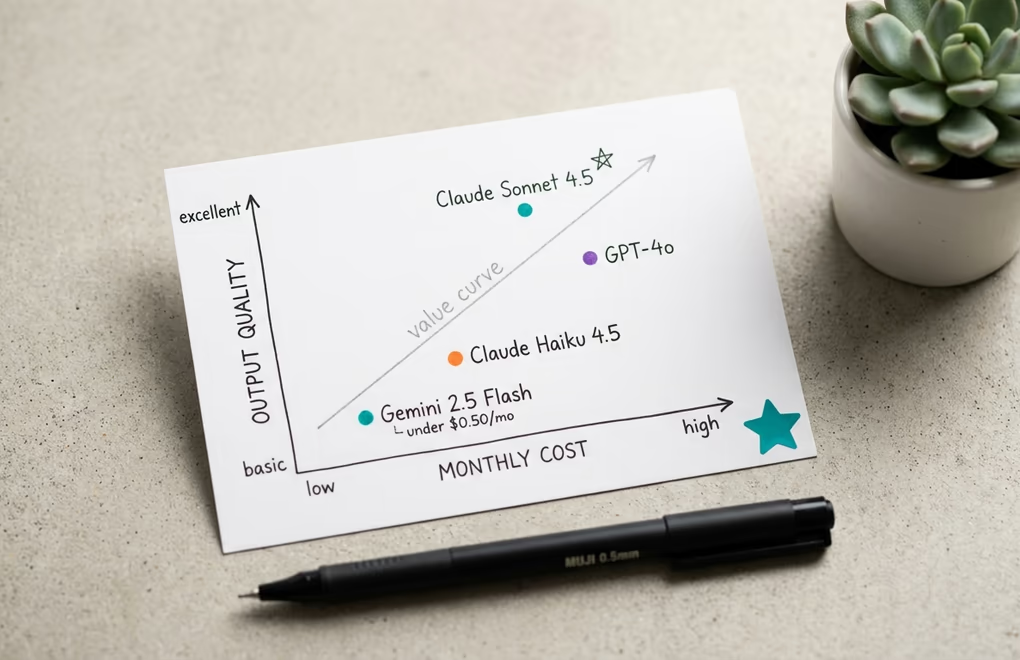
The model you choose with BYOK determines both the quality of your output and your monthly API cost, and the right choice depends on what you value more for each specific use case. For the majority of everyday LinkedIn posts - a thought leadership take, a professional observation, a quick industry commentary - the difference in output quality between a $0.10-per-month model and a $1-per-month model is noticeable but not decisive, and the cheaper model produces perfectly usable drafts that need only a light edit.
Gemini 2.5 Flash is the clear winner for budget-conscious creators who want real AI assistance at essentially zero cost. At a fraction of a cent per post, you can generate as many drafts as you want, experiment freely with different angles and formats, and use the model for everything from post generation to hook ideas to repurposing without any meaningful cost pressure. The output quality is strong enough for most professional LinkedIn content and has improved substantially with each model generation.
For creators who are serious about LinkedIn as a growth channel and want the best possible first drafts, Claude Sonnet 4.5 or GPT-4o deliver meaningfully better results - more nuanced, more distinctive, and closer to a voice-trained human first draft. At $0.50 to $1.50 per month for typical usage, the quality upgrade costs less than a coffee and produces content that needs less editing and performs better in the feed. The practical strategy most LinkedGrow users settle on is using a fast, cheap model for ideation and rough drafts, then switching to a premium model for the final post they plan to publish. Because model switching is a single dropdown change in LinkedGrow's settings, this hybrid approach costs very little extra and gives you the best of both.
The Real Question Is What You Are Paying For
The BYOK conversation is not really about whether $65 versus $20 per month matters to you. For many professionals it does not, and paying a premium for a polished all-in-one experience is a perfectly reasonable choice. The more important question is whether you understand what that premium is actually buying and whether it is delivering proportional value. If the AI generation you get from a $65 tool is materially better, more flexible, or more integrated than what you could get by connecting your own key to a $19 platform, then the premium is justified. If it is not - if the tool is simply reselling the same API access you could purchase directly at a 20x markup - then you are paying for the convenience of not knowing what the alternative looks like.
LinkedGrow's pricing is built on the premise that the platform itself should be what you pay for, and the AI should cost you as close to its actual market rate as possible. Run the numbers with the cost calculator for your specific usage, compare it against your current tool's plan, and let the math tell you whether the switch is worth making. For most creators we talk to, the answer is clear in about two minutes.
Frequently Asked Questions
For a typical creator posting three to five times per week, API costs run between $0.50 and $3.50 per month depending on which model you choose. Gemini 2.5 Flash is the cheapest at under $0.50 per month for most users. GPT-4o for heavy users stays under $3.50 per month. These costs go directly to Google, OpenAI, or Anthropic with no markup.
BYOK stands for Bring Your Own Key. Instead of paying a LinkedIn tool for AI generation credits at a markup, you connect your own API key from OpenAI, Anthropic, Google, or other providers. The tool handles the interface and features while you pay the AI provider directly at wholesale rates, which are a fraction of what bundled SaaS plans charge.
No. Getting an API key from OpenAI, Anthropic, or Google takes about three minutes: create an account, navigate to the API keys section, generate a key, and paste it into LinkedGrow's settings. You add a credit balance to your API provider account and the charges come directly from there. LinkedGrow's setup guide walks through each provider step by step.
Gemini 2.5 Flash offers the best quality-to-cost ratio for most LinkedIn content - it costs a fraction of a cent per post and produces strong results for standard text content. For posts where quality matters most, Claude Sonnet 4.5 or GPT-4o deliver noticeably better output at around $0.05 to $0.15 per post, still far cheaper than any bundled SaaS plan.
No. LinkedGrow's BYOK model means your API key connects directly to the AI provider. Every token you generate is billed directly by OpenAI, Anthropic, Google, or your chosen provider at their published rates. LinkedGrow charges only for the platform subscription itself, which covers all the features, scheduling, analytics, and workflow tools.